
Plustek OpticFilm серия Краткое руководство пользователя онлайн
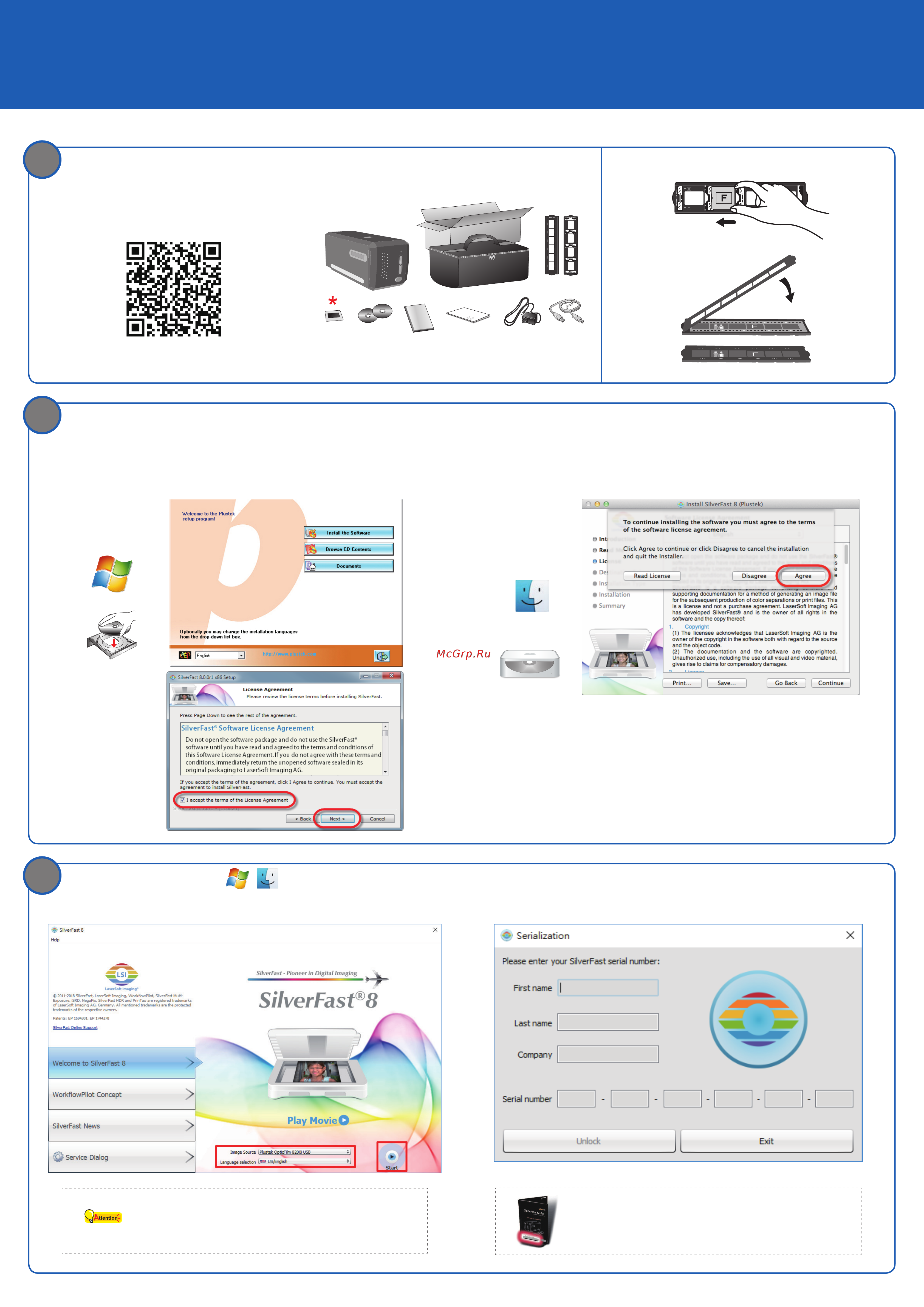
Unpack and Connect Place Film in the Holder
Scan me -- Installation Tutorial video
* 35 mm IT-8 Target (Only for OF8200i Ai)
Install Software
If you are installing the software without a CD/DVD drive, please refer to For Mac/PC without a CD/DVD drive section on the rear
side of this guide.
Insert the product CD and run your product’s software package.
* You do not have to install any scanner drivers when
installing the scanner under Mac OS. The scanner drivers
are already included within the SilverFast installation.
Unlock SilverFast
1. Check Image Source and Language Selection, then click Start.
Attention
If the Image Source is blank, please check if your scanner is properly
listed under [Imaging Devices] in [Device Manager].
2. Enter your First name, Last name, and the Serial number, then click Unlock.
* The SilverFast DVD-ROM should remain in the DVD-ROM drive for the Unlock process.
The SilverFast serial number is located on the front of the SilverFast
DVD-ROM case.
OpticFilm series Quick Start Guide
P/NO.: 17-07-2BB5090-C
2
3
1
Похожие устройства
-
 Plustek SmartOfficeРуководство по использованию
 -
 Plustek SmartOfficeЭксплуатационная инструкция
 -
 Plustek Smart OfficeИнструкция по применению
 -
 Plustek MobileOffice S400Руководство пользователя
 -
 Plustek OpticSlim 2610Инструкция по эксплуатации
 -
 Plustek eScan A150Инструкция по эксплуатации
 -
 Plustek OpticSlim 1180Инструкция по эксплуатации
 -
 Plustek MobileOffice C500Инструкция по эксплуатации
 -
 Plustek OpticPro A320Инструкция по эксплуатации
 -
 Plustek OpticBook 3800Инструкция по эксплуатации
 -
 Plustek OpticFilm 8200i SEИнструкция по эксплуатации
 -
 Plustek OpticSlim 2600Инструкция по эксплуатации