![Samsung UE65JU6800U — как подключить телевизор к Smart Control и сети [19/60]](/icons/site-icon-64.png)
Samsung UE65JU6800U — как подключить телевизор к Smart Control и сети [19/60]
Превью страниц
Страница 19 /
60
![Samsung UE65JU6800U [19/60] Tv camera connection](/views2/1210656/page19/bg13.png)
Pairing the TV to the Samsung Smart Control
If your Samsung Smart Control is not paired to your TV, press and hold the buttons
labelled ① and ② simultaneously for 3 seconds or more to pair the Samsung Smart
Control to the TV.
- The Samsung Smart Control can only be paired to one TV at a time.
TV Camera Connection
- The TV camera is sold separately.
- Make sure to connect only the TV camera to the TV CAMERA port.
Connecting to a Network
Connecting the TV to a network gives you access to online services, such as Smart Hub, as well as software updates.
Network Connection - Wireless
Connect the TV to the Internet using a standard router or modem.
Wireless IP Router or Modem with
a DHCP Server
LAN Cable (Not Supplied)
The LAN Port on the Wall
Network Connection - Wired
TV Rear Panel
Connect your TV to your network using a LAN cable.
- The TV does not support the network speeds less than or equal to 10 Mbps.
- Use a Category 7 cable for the connection.
English
English - 5
[JU6610-RU]BN68-07200H-00L04.indb 5 2015-04-08 오후 3:43:31
Содержание
258- Руководство пользователя
- Www samsung com register
- Не устанавливайте данное устройство в изолированном пространстве например в книжном шкафу или во встроенной мебели если не обеспечивается надлежащая вентиляция не устанавливайте данное устройство вблизи или поверх радиатора нагревателя или в местах подверженных воздействию прямых солнечных лучей во избежание возгорания или поражения электрическим током не размещайте на устройстве сосуды с водой вазы и т д
- Опасность поражения электрическим током не открывать
- Неправильное заземление может привести к поражению электрическим током или повреждению оборудования только для оборудования класса і
- Накопившаяся пыль может привести к поражению электрическим током утечке тока или возгоранию вследствие искрения нагревания кабеля питания или нарушения изоляции на нем
- Этот символ свидетельствует о том что внутри изделия имеется высокое напряжение любой контакт с деталями внутри изделия представляет опасность
- Этот символ обозначает что к изделию прилагается важный документ касающийся его эксплуатации и технического обслуживания
- Русский 2
- Предупреждение важные указания по безопасности
- Перед эксплуатацией телевизора ознакомьтесь с указаниями по безопасности
- Осторожно
- Что входит в комплект
- Использование контроллера телевизора
- Установка батарей в пульт samsung smart control
- Пульт samsung smart control
- Сопряжение телевизора samsung и пульта samsung smart control
- Проводное сетевое соединение
- Подключение тв камеры
- Подключение к сети
- Беспроводное сетевое соединение
- Функцию
- Выбор ключевого слова для перехода на соответствующую страницу
- Электронное руководство e manual
- Страницы
- Переход со страницы указателя тем электронного руководства к соответствующему экрану меню
- Переход к теме указанной на странице указателя тем электронного руководства
- Переход к соответствующему элементу меню чтобы немедленно опробовать эту
- Описание кнопок основного экрана электронного руководства
- Обновление электронного руководства до последней версии
- Исходная настройка
- Выбор элемента из списка результатов поиска для отображения соответствующей
- Выбор темы из списка недавно просмотренных тем
- Устранение неисправностей и обслуживание
- Поиск и устранение неисправностей
- Предупреждение относительно неподвижных изображений
- Очистка поверхности телевизора
- Датчик экономного режима и яркость экрана
- Русский
- Характеристики набора для настенного крепления vesa
- Установка телевизора
- Установка настенного крепления
- Установка звуковой панели с настенным креплением может не поддерживаться в зависимости от страны или модели
- Устанавливайте настенное крепление на прочную стену перпендикулярно полу в случае монтажа настенного крепления на другие виды поверхностей помимо изготовленных из гипсокартона обратитесь за консультацией к местному дилеру при установке на потолке или наклонной стене телевизор может упасть и стать причиной тяжелой травмы
- См руководство по установке к набору samsung для настенного монтажа
- Русский 9
- При монтаже звуковой панели с телевизором на стену с помощью настенного крепления сначала установите на телевизор звуковую панель а потом прикрепите телевизор с установленной панелью к настенному креплению дополнительные сведения см в документации к звуковой панели
- При креплении телевизора на стену следует строго придерживаться рекомендаций производителя в случае неправильной установки изделие может соскользнуть или упасть и нанести серьезные травмы ребенку или взрослому человеку кроме того возможны серьезные повреждения самого устройства
- Подробную информацию об установке настенного крепления см в инструкциях прилагаемых к набору для настенного монтажа рекомендуем осуществлять установку настенного кронштейна под руководством технического специалиста не следует выполнять установку самостоятельно samsung electronics не несет ответственности за повреждения изделия или травмы полученные в результате самостоятельной установки настенного крепления покупателем
- Перед установкой винтов для настенного крепления приложите пенопласт из упаковки к фронтальной части телевизора чтобы не повредить его затем положите телевизор и затяните винты
- Монтаж телевизора на стене
- Крепление телевизора к стене можно осуществить с помощью набора для настенного монтажа не входит в комплект модели имеющие в комплекте адаптер для крепления на стену следует устанавливать как показано на рисунках ниже перед установкой набора для настенного монтажа
- Для упаковки телевизоров с диагональю экрана 40 дюймов и менее пенопласт не используется
- Обеспечение достаточной вентиляции для телевизора
- Укладка кабелей с помощью направляющей для кабеля
- Предотвращение падения телевизора
- Меры предосторожности крепление телевизора к стене
- Крепление телевизора к подставке
- Уменьшение потребления электроэнергии
- Технические характеристики и прочая информация
- Технические характеристики
- Русский 13
- Русский
- Рекомендация только для стран ес
- Поиск данных по категориям продуктов и указав название модели
- Настоящим компания samsung electronics заявляет что данный телевизор удовлетворяет основным требованиям и другим положениям директивы 1999 5 ec
- Лицензии
- Данное оборудование можно использовать только в помещении
- Данное оборудование можно использовать во всех странах ес
- The terms hdmi and hdmi high definition multimedia interface and the hdmi logo are trademarks or registered trademarks of hdmi licensing llc in the united states and other countries
- Режим ожидания
- Знак имеет форму квадрата минимальная длина сторон 5 мм
- Www samsung com register
- User manual
- Warning important safety instructions
- Risk of electric shock do not open
- Please read the safety instructions before using your tv
- English 2
- Caution
- What s in the box
- Using the tv controller
- The samsung smart control
- Installing batteries into the samsung smart control
- Network connection wireless
- Network connection wired
- Connecting to a network
- Tv camera connection
- Pairing the tv to the samsung smart control
- Using the buttons available on the main screen of the e manual
- Updating the e manual to the latest version
- The e manual
- Select an item from the search results to load the corresponding page
- Select a topic from the list of recently viewed topics
- Select a keyword to navigate to the relevant page
- Initial setup
- Accessing the associated menu screen from an e manual topic page
- Access the associated menu item and try out the feature directly
- Access a topic referred to on an e manual topic page
- Troubleshooting and maintenance
- Troubleshooting
- Eco sensor and screen brightness
- Caring for the tv
- Still image warning
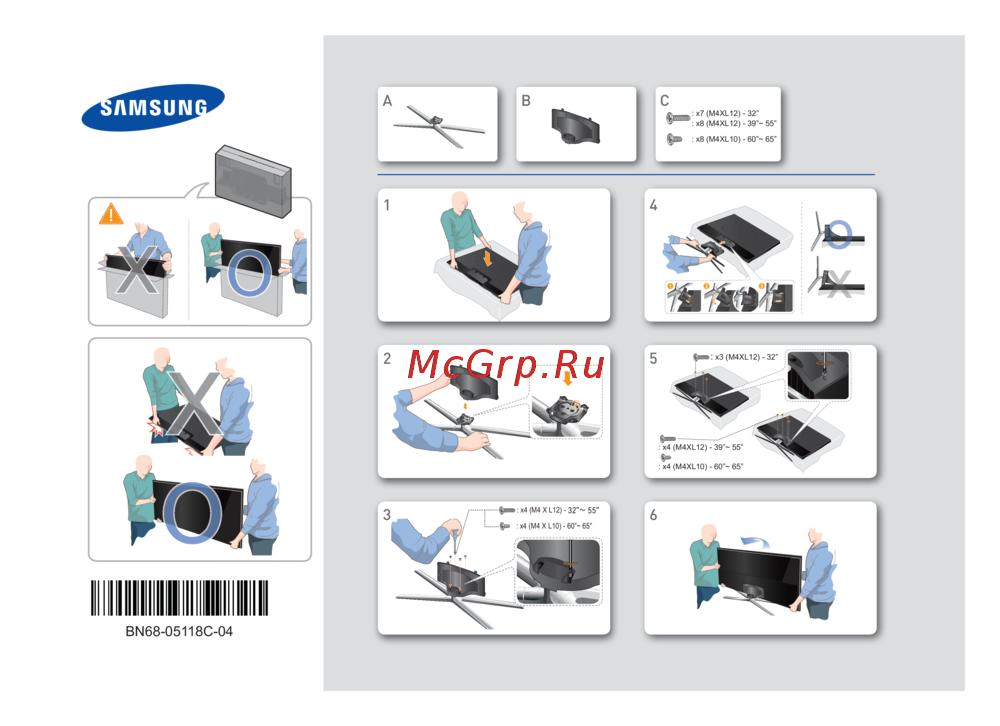
- You can mount the tv on the wall using a wall mount kit sold separately for models providing wall mount adapters install them as shown in the figures below before installing the wall mount kit
- You can install your wall mount on a solid wall perpendicular to the floor before attaching the wall mount to surfaces other than plaster board contact your nearest dealer for additional information if you install the tv on a ceiling or slanted wall it may fall and result in severe personal injury
- Vesa wall mount kit notes and specifications
- Tv installation
- To mount both a soundbar and the tv onto a wall using the wall mount mount the soundbar onto the tv first and then mount the tv soundbar combination onto the wall mount for detailed information see the instructions provided with the soundbar
- The styrofoam is not provided for the 40 inch or less tvs
- The soundbar installation with the wall mount may not be supported for the specific region or model
- Refer to the installation manual included with the samsung wall mount kit
- Mounting the tv on a wall
- Installing the wall mount kit
- If you mount this product on a wall follow the instructions exactly as recommended by the manufacturer unless it is correctly mounted the product may slide or fall thus causing serious injury to a child or adult and serious damage to the product
- For detailed information about installing the wall mount see the instructions provided with the wall mount kit we recommend that you contact a technician for assistance when installing the wall mount bracket we do not advise you to do it yourself samsung electronics is not responsible for any damage to the product or injury to yourself or others if you choose to install the wall mount on your own
- English 9
- English
- Before you install the screws for the wall mount put the styrofoam that came with the tv s packaging on the tv to protect it then lay the tv down and attach the screws
- Providing proper ventilation for your tv
- Arranging the cables with the cable guide
- Safety precaution securing the tv to the wall
- Preventing the tv from falling
- Attaching the tv to the stand
- Specifications and other information
- Specifications
- Decreasing power consumption
- This equipment may be operated in all eu countries
- The terms hdmi and hdmi high definition multimedia interface and the hdmi logo are trademarks or registered trademarks of hdmi licensing llc in the united states and other countries
- Search product support and enter the model name
- Recommendation eu only
- Licences
- Hereby samsung electronics declares that this tv is in compliance with the essential requirements and other relevant provisions of directive 1999 5 ec
- English 13
- English
- This equipment may only be used indoors
- Посібник користувача
- Www samsung com register
- Українська 2
- Увага важливі інструкції з техніки безпеки
- Увага
- Перш ніж користуватися телевізором прочитайте вказівки з техніки безпеки
- Неправильне заземлення може призвести до ураження електричним струмом або пошкодження пристрою лише обладнання класу 1
- Небезпека ураження електричним струмом не відкривати
- Не встановлюйте пристрій у замкненому просторі наприклад на книжковому стелажі чи у стінній шафі якщо при цьому не забезпечується належна вентиляція не встановлюйте пристрій поблизу обігрівача або терморезистора а також у місцях відкритих для прямого сонячного світла не ставте на пристрій посуд із водою зокрема вази з квітами оскільки це може спричинити займання або ураження електричним струмом
- Накопичення пилу може спричинити ураження струмом витік електроенергії або займання внаслідок утворення іскор чи нагрівання кабелю живлення або погіршення його ізоляції
- Що в упаковці
- Робота з контролером телевізора
- Пульт samsung smart control
- Встановлення батарей у пульт samsung smart control
- З єднання в пару телевізора і пульта samsung smart control
- Під єднання камери для телевізора
- Під єднання до мережі дротове з єднання
- Під єднання до мережі бездротове з єднання
- Під єднання до мережі
- Як користуватися кнопками на головному екрані електронного посібника
- Початкове налаштування
- Посібника
- Оновлення електронного посібника до найновішої версії
- Електронний посібник
- Доступ до теми посилання на яку наведено на тематичній сторінці електронного
- Доступ до екрана пов язаного меню з тематичної сторінки електронного посібника
- Вибір теми зі списку тем які нещодавно переглядалися
- Вибір потрібного з поміж результатів пошуку для завантаження відповідної сторінки
- Вибір ключового слова для переходу до відповідної сторінки
- Безпосередній доступ до пов язаного пункту меню і запуск функції
- Усунення несправностей
- Усунення несправностей та обслуговування
- Попередження щодо нерухомого зображення
- Екодатчик і яскравість зображення
- Догляд за телевізором
- Українська
- Телевізор можна монтувати на стіні за допомогою комплекту настінного кріплення продається окремо для моделей із адаптерами настінного кріплення перш ніж монтувати комплект настінного кріплення встановіть адаптери настінного кріплення як показано на малюнках нижче
- Пінополістирол не постачається з моделями телевізорів з екраном діагоналлю 40 дюймів або менше
- Примітки і технічні характеристики комплекту настінного кріплення vesa
- Перш ніж встановлювати гвинти для настінного кріплення прикладіть до телевізора пінополістирол який знайдете в упаковці щоб захистити екран телевізора потім покладіть телевізор і вкрутіть гвинти
- Монтування телевізора на стіні
- Монтування комплекту настінного кріплення
- Можливість встановлення звукової панелі на настінному кріпленні може не підтримуватися у певному регіоні чи для певної моделі
- Детальну інформацію про монтування настінного кріплення читайте в посібнику який додається до комплекту настінного кріплення з питаннями щодо монтування настінного кронштейна звертайтеся до спеціаліста технічної служби не рекомендовано робити це самостійно компанія samsung electronics не несе відповідальності за ушкодження виробу або травми отримані користувачами у разі самостійного встановлення настінного кріплення
- Встановлюйте настінне кріплення на твердій стіні перпендикулярній до підлоги перш ніж кріпити настінне кріплення до інших поверхонь аніж гіпсова плита зверніться до найближчого дилера по додаткову інформацію якщо встановити телевізор на стелі або похилій стіні він може впасти і завдати серйозних травм користувачеві
- Встановлення телевізора
- Виріб слід кріпити на стіні або стелі тільки у спосіб вказаний виробником у разі неправильного кріплення виріб може зісковзнути або впасти завдавши серйозної шкоди дітям або дорослим та пошкодитися сам
- Якщо ви хочете встановити звукову панель і телевізор на стіні за допомогою настінного кріплення спершу прикріпіть звукову панель до телевізора а тоді примонтуйте поєднання телевізора звукової панелі до настінного кріплення докладніше читайте у вказівках які додаються до звукової панелі
- Читайте посібник зі встановлення що постачається із комплектом настінного кріплення samsung
- Українська 9
- Забезпечення належної вентиляції для телевізора
- Впорядкування кабелів за допомогою напрямної для кабелів
- Заходи безпеки кріплення телевізора на стіні
- Встановлення телевізора на підставці
- Вказівки щодо запобігання падінню телевізора
- Характеристики
- Технічні характеристики та інша інформація
- Зменшення споживання електроенергії
- Українська
- Рекомендації лише для єс
- Пошук пристрою і введіть номер моделі
- Ліцензії
- The terms hdmi and hdmi high definition multimedia interface and the hdmi logo are trademarks or registered trademarks of hdmi licensing llc in the united states and other countries
- Цим компанія samsung electronics стверджує що цей телевізор зі світлодіодною підсвіткою екрана відповідає усім важливим вимогам та іншим відповідним положенням директиви 1999 5 ec
- Цей виріб можна використовувати лише у приміщенні
- Цей виріб можна використовувати в усіх країнах єс
- Українська 13
- Пайдаланушы нұсқаулығы
- Www samsung com register
- Тд ды пайдалану алдында осы қауіпсіздік нұсқауларын оқуыңызды сұраймыз
- Казақ 2
- Ескерту қауіпсіздік туралы маңызды нұсқаулар
- Ашпаңыз электр қатеріне ұшырайсыз
- Абай болыңыз
- Қорап ішінде не бар
- Тд басқарушысын қолдану
- Samsung smart control құралына батареяларды орнату
- Samsung smart control құралы
- Желіге қосылу
- Тд камерасын жалғау
- Тд ды samsung smart control құралымен жұптастыру
- Желілік байланыс сымсыз
- Желілік байланыс сым арқылы
- Эл нұсқаулықтың тақырып бетінен тиісті мәзір экранына өту
- Эл нұсқаулықтың тақырып бетінде ұсынылған тақырыпқа өтіңіз
- Эл нұсқаулықтың негізгі экранындағы түймешіктерді пайдалану
- Эл нұсқаулықты соңғы нұсқасына дейін жаңарту
- Эл нұсқаулық
- Тиісті мәзір экранына өту арқылы функцияны тікелей қолданып көріңіз
- Тиісті бетті жүктеу үшін іздеу нәтижелерінің ішінен элементті таңдаңыз
- Тиісті бетке өту үшін кілт сөзді таңдаңыз
- Параметрлерді бастапқы орнату
- Жақында қаралған тақырыптар тізімі ішінен тақырыпты таңдаңыз
- Ақаулықты түзету және жөндеу
- Ақаулықты түзету
- Қимылсыз суретке қатысты ескерту
- Эко сенсор және экранның жарықтылығы
- Тд ды күтіп ұстау
- Қабырғалық аспа жинақты орнату
- Тд ды қабырғаға орнату
- Тд ды орнату
- Vesa қабырғалық аспа жинағына қатысты ақпарат және оның параметрлері
- Тд ды дұрыс желдету
- Сымдарды сым бағыттағыштың көмегімен реттеу
- Тд дың құлап қалуына жол бермеу
- Тд ды тұрғыға бекіту
- Сақтық шарасы тд ды қабырғаға бекіту
- Техникалық параметрлері және басқа ақпарат
- Техникалық параметрлері
- Пайдаланылатын қуат мөлшерін азайту
- Samsung electronics осы мәлімдеме арқылы осы тд дың 1999 5 ec ережесінің маңызды талаптары мен басқа да тиісті шарттарына сай келетінін мәлімдейді
- Өнімге қолдау көрсету қойындысына барып үлгінің атауын енгізу арқылы қол жеткізуге болады
- Ұсыныс тек ео үшін ғана
- Лицензиялар
- Казақ 13
- Казақ
- Бұл құрылғыны барлық ео елдерінде қолдануға болады
- Бұл құрылғы тек үй ішінде ғана қолдануға болады
- The terms hdmi and hdmi high definition multimedia interface and the hdmi logo are trademarks or registered trademarks of hdmi licensing llc in the united states and other countries
- Күту режимі
- Знак имеет форму квадрата минимальная длина сторон 5 мм
- Bn68 07200h 00
- 2015 samsung electronics co ltd all rights reserved
Похожие устройства
-
 Samsung UE46F6400AK2013_TV_Firmware_Upgrade_Instruction
 -
 Samsung UE40F6540ABКраткая инструкция
 -
 Samsung UE65JS9000Инструкция по эксплуатации
 -
 Samsung UE65JU7500UXИнструкция по эксплуатации
 -
Samsung UE55JS8500Инструкция по эксплуатации
-
Samsung UE65JS8500Инструкция по эксплуатации
-
Samsung UE85JU7000UXИнструкция по эксплуатации
-
Samsung UE78JU7500UXИнструкция по эксплуатации
-
 Samsung ue40f6400akxИнструкция по эксплуатации
 -
 Samsung ue60h6200akИнструкция по эксплуатации
 -
Samsung UE40F6400AKИнструкция по установке
-
Samsung UE40F6400AKИнструкция по обновлению
Узнайте, как правильно подключить ваш телевизор к Smart Control и сети для доступа к онлайн-сервисам и обновлениям. Подробные инструкции по беспроводному и проводному подключению.