![Huawei M835 — mobile Phone Data Protection: Security Tips and Usage Precautions [6/72]](/icons/site-icon-64.png)
Huawei M835 — mobile Phone Data Protection: Security Tips and Usage Precautions [6/72]
Превью страниц
Страница 6 /
72
![Huawei M835 [6/72] Personal information and data security](/views2/1004109/page6/bg6.png)
2
1.2 Personal Information and Data
Security
The use of some functions or third-party applications on your device could result in
your personal information and data being lost or becoming accessible to others.
Several measures are recommended to help you protect personal and confidential
information.
• Place your device in a safe area to prevent it from unauthorized use.
• Set your device screen to lock and create a password or unlock pattern to open it.
Do not place your mobile phone or its accessories in containers with
a strong electromagnetic field.
Do not place magnetic storage media near your mobile phone.
Radiation from the phone may erase the information stored on them.
Do not put your mobile phone in a high-temperature place or use it in
a place with flammable gas such as a gas station.
Keep your mobile phone and its accessories away from children. Do
not allow children to use your mobile phone without guidance.
Use only approved batteries and chargers to avoid the risk of
explosions.
Observe any laws or regulations on the use of wireless devices.
Respect others’ privacy and legal rights when using your wireless
device.
Strictly follow the relevant instructions of this manual while using the
USB cable. Otherwise your mobile phone or PC may be damaged.
Содержание
480- Welcome to huawei
- User guide huawei m835
- Contacts 1
- Getting to know your mobile phone
- Contents
- Calling 7
- Reading before proceeding
- Using the onscreen keyboard 4
- Using other applications 9
- Synchronizing information 6
- Messaging 7
- Google services 0
- Getting connected 1
- Entertainment 5
- Managing your mobile phone 4
- Appendix 9
- Safety precautions
- Reading before proceeding
- Personal information and data security
- Legal notice
- Copyright huawei technologies co ltd 2011 all rights reserved
- Notice
- Trademarks and permissions
- Third party software statement
- Limitations of liability
- Import and export regulations
- Disclaimer of warranties
- Phone at a glance
- Mobile phone view
- Key functions at your fingertips
- Getting to know your mobile phone
- Voice diale
- Call lo
- Remove the battery cover
- Installing your mobile phone
- Installing the battery and the microsd card
- Install the battery install the battery cover
- Insert the microsd card
- Status indicator
- Important information about the battery
- Charging the battery
- Battery saving tips
- Using the touchscreen
- Touchscreen actions
- Touch and hol
- Setting
- Rotating your mobile phone screen
- Powering on your mobile phone
- Powering off your mobile phone
- Power on or off your mobile phone
- Power of
- Phone option
- Displa
- Auto rotate scree
- Unlocking the screen
- Locking the screen
- Locking and unlocking the screen
- Notification and status icons
- Home screen
- Notification panel
- Viewing other parts of the home screen
- Opening the notification panel
- Moving a screen item
- Customizing the home screen
- Closing the notification panel
- Adding a new screen item
- Add to home screen
- Picture
- Live wallpaper
- Changing the wallpaper
- Wallpaper
- Wallpape
- Using the microsd card as usb mass storage
- Using a microsd card
- Usb connecte
- Turn on usb storag
- Removing a screen item
- Removing the microsd card
- Making a call with the dialer application
- Making a call
- Calling
- End cal
- Contact
- Call lo
- Answering or rejecting a call
- Answering an incoming call
- Making a call from contacts
- Making a call from call log
- Ending a call
- Rejecting an incoming call
- Other operations during a call
- Merge call
- Making a conference call
- End cal
- Contact
- Call lo
- Add cal
- Contact
- Call lo
- Airplane mod
- Adding an entry to contacts
- Add to contact
- Using the tty device
- Using call log
- Using airplane mode
- Tty operation
- Switching between calls
- Swap call
- Create new contac
- Setting the tty mode
- Setting hearing aid compatibility
- Opening the contacts application
- Contacts
- Edit contac
- Create contac
- Adding a contact to your favorites
- Adding a contact
- Add to favorite
- Searching for a contact
- Favorite
- Editing a contact
- Managing groups
- Favorite
- Deleting a contact
- Delete contac
- Creating a group
- Create grou
- Contact
- Connecting through quick contact for android
- Communicating with your contacts
- Communicating with a contact
- Displaying the keyboard panel
- Choosing an input method
- Adding a contact to your groups
- Using the onscreen keyboard
- Editing a group
- Using the android keyboard
- Z x c v b n m
- Using the swype keyboard
- R t y u i o p
- A s d f g h j k
- Using the landscape keyboard
- Sms and mms
- Opening messaging
- Messaging
- Customizing keyboard settings
- Creating and sending a text message
- Adding a slideshow
- Add subjec
- Add slid
- Slidesho
- Opening and viewing a multimedia message
- New messag
- Messagin
- Insert smile
- Creating and sending a multimedia message
- Contact
- Setting
- Replying to a message
- Multiselec
- Messagin
- Manual setu
- Customizing the message settings
- Adding an email account
- Add accoun
- Account
- Viewing an email message
- Save as draf
- Replying to an email message
- Reply al
- Creating and sending an email message
- Compos
- Attachmen
- Adding other email accounts
- Turning on the data service
- Getting connected
- Deleting an email account
- Changing email account settings
- Metrowe
- Connecting to a wireless network
- Connec
- Add wi fi networ
- Wireless network
- Wi fi setting
- Wi fi network
- Turning on wi fi
- Setting
- Opening the metroweb
- New windo
- Metroweb
- Setting
- Set home pag
- Refres
- Opening a web page
- Managing bookmarks
- Forwar
- Bookmark
- Adding a bookmark
- Window
- Setting a home page
- Wireless network
- Turning on bluetooth
- Setting
- Pairing and connecting a bluetooth device
- Opening a bookmark
- Most visite
- Metrowe
- Histor
- Discoverabl
- Customizing the metroweb settings
- Bookmark
- Bluetooth setting
- Bluetooth
- Bluetoot
- Wireless network
- Setting
- Sending files via bluetooth
- Entertainment
- Disconnecting or unpairing a bluetooth device
- Bluetooth setting
- Bluetooth device
- Bluetoot
- Taking photos and recording videos
- Taking a photo
- Opening your camera
- Capture screen
- Using the gallery
- Recording a video
- Opening the gallery
- Galler
- Viewing your videos
- Viewing your photos
- Viewing a picture
- Setting
- Rotating a picture
- Rotate righ
- Rotate lef
- Galler
- Discar
- Cropping a picture
- Capture vide
- Capture pictur
- Enjoying music
- Dts mod
- Dts envelo
- Copying music to the microsd card
- Using dts envelo
- Setting
- Galler
- Playlist
- Playing music
- Playing a playlist
- Opening the media library
- Google services
- Current playlis
- Artist
- Adding music to a playlist
- Add to playlis
- Google terms of servic
- Creating a google account
- Add accoun
- Accounts sync setting
- Using gmail
- Sign i
- Opening gmail
- I agree nex
- Switching between accounts
- Searching for an email
- Replying to or forwarding an email
- Reply al
- Forwar
- Creating and sending an email
- Compos
- Add cc bc
- Account
- Adding a friend
- Add frien
- Accepting an invitation
- Using talk
- Starting a chat
- Setting notifications for new instant messages
- Setting
- Send invitatio
- Opening talk
- Customizing your gmail settings
- Signing out of talk
- Sign ou
- Setting
- Select ringtone
- Opening maps
- My locatio
- Location securit
- Im notificatio ns
- Enabling location source
- Vibrate
- Using maps
- Use wireless network
- Use gps satellite
- Using market
- Searching for places of interest
- Searching for applications
- Opening market
- Getting directions
- Direction
- Clear ma
- Android market terms of service
- My app
- Installing an application
- Developer info
- Application
- Unknown source
- Uninstalling an application
- Uninstal
- Synchronizing information
- Setting
- Setting
- Managing your accounts
- Contact
- Adding an account
- Add accoun
- Accounts sync setting
- Accounts syn
- Configuring general sync settings
- Calenda
- Background dat
- Accounts sync setting
- Sign ou
- Removing an account
- Refres
- Customizing your account synchronization
- Using the calendar
- Using other applications
- Opening the calendar
- Creating an event
- Changing an account s synchronization settings
- Reminder
- New even
- Hide declined event
- Default reminder tim
- Customizing the calendar settings
- All da
- Add reminde
- Vibrat
- Setting an event reminder
- Setting
- Set alerts notification
- Select rington
- Repetition
- Vibrat
- Using the clock
- Setting an alarm
- Setting
- Rington
- Opening the clock
- Opening the alarms
- Customizing alarm settings
- Adding an alarm
- Add alar
- Using the file manager
- Unselect al
- Select al
- Opening the file manager
- New folde
- Moving or copying a file
- File manage
- Doing a quick search for a file
- Creating a folder
- Memory statu
- File manage
- Calculato
- Basic pane
- Advanced pane
- Add text not
- Add paint not
- Viewing your memory status
- Using the richpad
- Using the calculator
- Switching to the advanced panel
- Richpa
- Opening the calculator
- New searc
- Turning on silent mode
- Setting the display
- Setting the date and time
- Setting ringers
- Managing your mobile phone
- Adjusting the time before the screen turns off
- Adjusting the screen brightness
- Call setting
- Adjusting the volume
- Vibrat
- Setting your phone to vibrate for incoming calls
- Setting phone services
- Setting
- Select rington
- Phone rington
- Messagin
- Customizing call settings
- Changing the phone ringtone
- Changing the message ringtone
- Mobile network
- Installing voice data
- Install voice dat
- Data roamin
- Data enable
- Adjusting the speech rate
- Wireless network
- Voice input outpu
- Turning on data roaming
- Text to speech settings
- Switching off the data service
- Speech rat
- Setting text to speech
- Setting
- Protecting your mobile phone with a screen lock
- Protecting your mobile phone
- Location securit
- Forgot pattern
- Continu
- Confir
- Change screen loc
- Application
- Viewing an installed application
- Unlocking your mobile phone if you forget the lock pattern
- Sort by siz
- Setting
- Set up screen loc
- Removing an installed application
- Patter
- Managing applications
- Manage application
- Move to sd car
- Move to phon
- Metrowe
- Manage application
- Backing up my data
- Back up my dat
- Application
- Ways to free up your mobile phone memory
- Uninstal
- Setting
- Resetting your mobile phone
- Privac
- Moving an application to microsd card
- Warnings and precautions
- Restoring factory data
- Medical device
- Electronic device
- Appendix
- Traffic security
- Potentially explosive atmosphere
- Prevention of hearing damage
- Operating environment
- Accessories
- Safety of children
- Battery and charger
- Cleaning and maintenance
- Fcc statement
- Emergency call
- Certification information sar
- Hearing aid compatibility hac regulations for mobile phones
- Caution
- How do i set the unlock pattern
- How do i set a song as phone ringtone
- How do i return to the calling screen
- How do i prevent automatic switching of orientation when rotating phone
- How do i create an application shortcut on the home screen
- How can i change the keyboard mode
- Displa
- Auto rotate scree
- Use as phone rington
- Setting
- Set up screen loc
- Patter
- Location securit
- How do i stop the song playing in the background
- Why am i unable to use navigation
- How do i hide the keyboard
- How do i forward a message
- V100r001_01
Похожие устройства
-
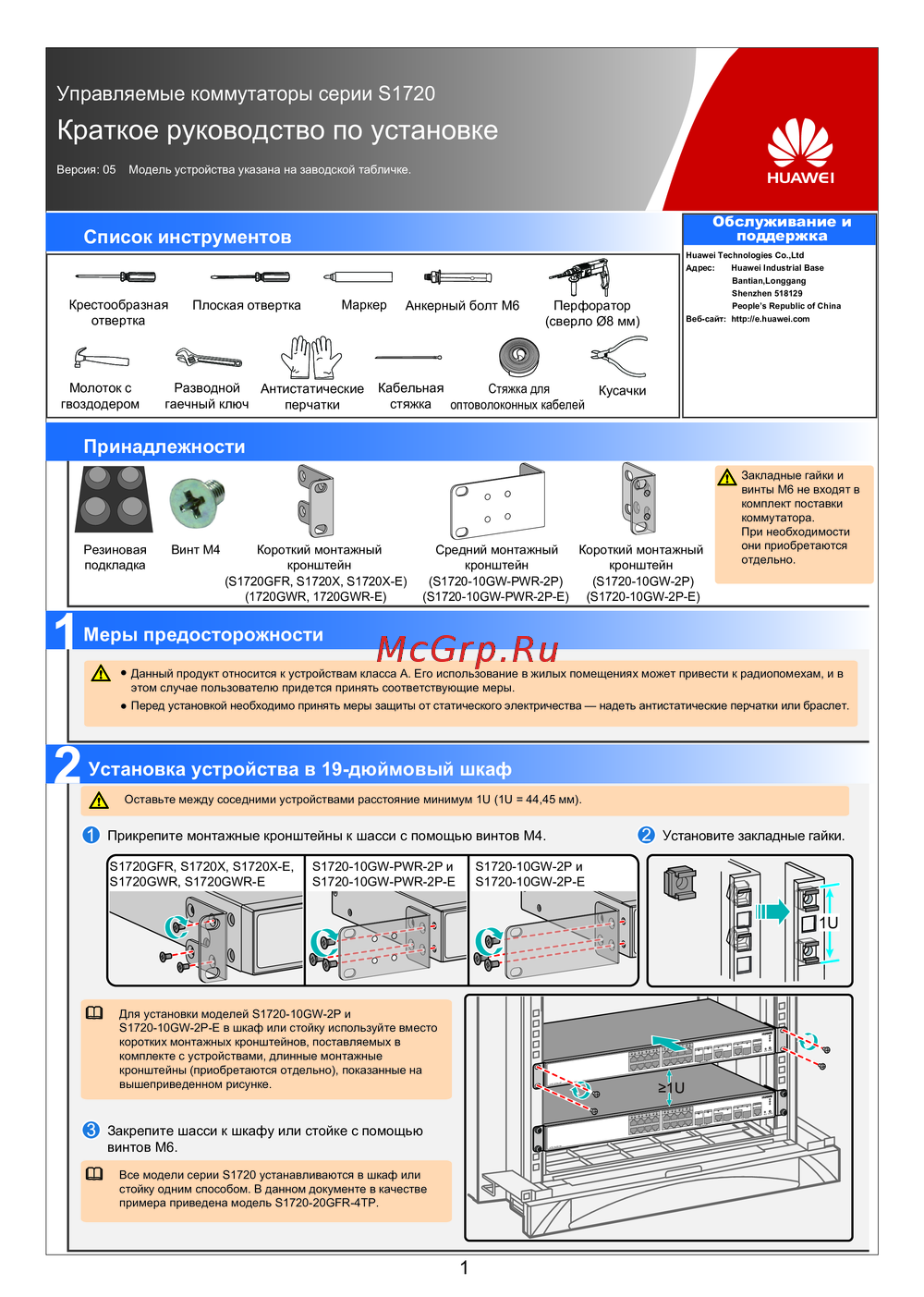 Huawei S1720-28GFR-4TP-ACКраткий обзор функций
 -
Huawei S1720-20GFR-4TPКраткая инструкция
-
Huawei S1720-10GW-2P-EСжатое руководство пользователя
-
Huawei S1720-10GW-2PБыстрый старт
-
Huawei S1720-10GW-PWR-2P-EКраткое руководство
-
Huawei S1720-10GW-PWR-2PКраткая инструкция по использованию
-
Huawei S1720GWR-EКраткая инструкция по использованию
-
Huawei S1720GWRКраткая инструкция по использованию
-
Huawei S1720X-EКраткое руководство
-
Huawei S1720XБыстрый старт
-
Huawei S1720GFRКраткое руководство пользователя
-
 Huawei CE6880Краткая эксплуатационная инструкция
Learn essential mobile phone security measures to protect your data. Prevent unauthorized access, avoid electromagnetic interference, keep devices away from children, use approved accessories, and comply with regulations. Follow these tips to stay safe.
