![Huawei U8100 — как совершать и принимать звонки с помощью журнала вызовов [47/187]](/icons/site-icon-64.png)
Huawei U8100 — как совершать и принимать звонки с помощью журнала вызовов [47/187]
Превью страниц
Страница 47 /
187
![Huawei U8100 [47/187] Making a call from call log](/views2/1004135/page47/bg2f.png)
41
Calling
Making a Call from Call log
1. Touch > Call log to display the call log.
If you are already working with Contacts or Dialer, touch the Call log
tab.
2. Touch to the right of the log entry to dial.
Tip: If you touch and hold the log entry, the options menu for
communicating with that contact in other ways will open.
Answering and Rejecting a Call
Answering an Incoming Call
When you receive a phone call, the incoming call screen opens
with the caller ID and any additional information about the caller
that you have entered in Contacts.
• Press to answer the call.
• Drag the to the right.
Содержание
309- User guide
- Wonderful communication mobile life
- Contacts 47
- Calling 37
- Reading before proceeding 1
- Getting to know your mobile phone 7
- Using the onscreen keyboard 58
- Messaging 69
- Getting connected 80
- Entertainment 92
- Using other applications 129
- Synchronizing information 123
- Managing your mobile phone 144
- Google services 108
- Appendix 158
- Safety precautions
- Reading before proceeding
- Trademarks and permissions
- Notice and copyright
- Copyright huawei technologies co ltd 2010 all rights reserved
- Notice
- No warranty
- Import and export regulations
- What s in the box
- Getting to know your mobile phone
- Safety information
- Quick start guide
- Mobile phone view
- Key features at a glance
- Headset with a 3 mm connector
- Getting to know your mobile phone
- Key functions at your fingertips
- Press to return to the home screen
- Press to hang up a call
- Installing the sim card
- Getting started with your mobile phone
- Press to return to the previous screen or exit the application you are running
- Installing the battery
- Important information about the battery
- Charging the battery
- Powering on your mobile phone
- Power on or off your mobile phone
- Setting up your mobile phone
- Using the touchscreen
- Touchscreen actions
- Powering off your mobile phone
- Rotating your mobile phone screen
- Locking the screen
- Locking and unlocking the screen
- Unlocking the screen
- Home screen
- Extending the home screen
- Customizing the screen
- Adding a new screen item
- Moving a screen item
- Removing a screen item
- Getting to know the canvas
- Expanding the canvas
- Canvas
- The desktop cannot be expanded at this time
- Expand the desktop
- Widgets
- Folders
- Creating a folder
- Renaming a folder
- Changing the wallpaper
- Changing a theme
- Notification and status icons
- Notifications and status information
- Notification panel
- Opening the notification panel
- Closing the notification panel
- Using a microsd card
- Remove the battery cover
- Installing the microsd card
- Insert the microsd card as shown in the diagram
- Using the microsd card as usb mass storage
- Touch mount in the dialog box that opens to confirm that you want to transfer files your pc will detect the microsd card as a removable disk you can now transfer files from your pc to your mobile phone s microsd card
- To transfer all your favorite music and pictures from your pc onto your mobile phone s microsd card set the microsd card as usb mass storage
- Open the notification bar and then touch usb connected
- Connect your mobile phone to your pc with the usb cable
- Removing the microsd
- Making a call
- Calling
- Touch the appropriate numerical keys to enter the phone number
- Press or touch to initiate the call
- Making a call with the dialer
- Dialer to display the dialer
- Dialing panel
- Making a call from contacts
- Making a call from call log
- Answering and rejecting a call
- Answering an incoming call
- Rejecting an incoming call
- Ending a call
- Other operations during a call
- Making a conference call
- Using call log
- Switching between calls
- Adding an entry to contacts
- Using the airplane mode
- Opening the contacts application
- Contacts
- Importing contacts from a sim card
- Adding a contact
- Searching for a contact
- Adding a contact to your favorites
- Editing a contact
- Touch the picture frame icon to select a picture to display next to the name in your list of contacts and in other applications
- Contacts
- Contact editing screen
- Viewing contact details
- Contact details
- Connecting through quick contact for android
- Communicating with your contacts
- Quick contact for android
- Deleting a contact
- Communicating with a contact
- Using the onscreen keyboard
- Displaying the keyboard panel
- Choosing an input method
- Using the touchpal keyboard panel
- Using the onscreen keyboard
- The keyboard panel will be automatically displayed
- Choose the input method
- Switching the keyboard layout
- Using the android keyboard
- Using the landscape keyboard
- Customizing keyboard settings
- Sms and mms
- Messaging
- Creating and sending a text message
- Opening messaging
- Creating and sending a multimedia message
- Opening and viewing a multimedia message
- Adding a slideshow
- Replying to a message
- Customizing the message settings
- Adding an email account
- Viewing an email message
- Adding other email accounts
- Replying to an email message
- Creating and sending an email message
- Deleting an email account
- Changing email account settings
- Gprs 3g
- Getting connected
- Checking the network connection
- Turning on wi fi
- Turning on the data service
- Connecting to a wireless network
- Browser
- Opening the browser
- Opening a web page
- Setting a home page
- Managing bookmarks
- Adding a bookmark
- Opening a bookmark
- Customizing the browser settings
- Bluetooth
- Turning on bluetooth
- Pairing and connecting a bluetooth device
- Sending files via bluetooth
- Connecting to a computer via usb
- Using the microsd card as usb mass storage
- Disconnecting or unpairing a bluetooth device
- Removing the microsd while your mobile phone is on
- Modem behaviour
- Taking photos and recording videos
- Opening your camera
- Entertainment
- Capture screen
- Taking a photo
- Viewing your photos
- Shooting a video
- Viewing your videos
- Using the gallery
- Opening the gallery
- Viewing a picture
- Cropping a picture
- Rotating a picture
- Enjoying music
- Copying music to the microsd card
- Playing music
- Opening the media library
- Music player screen
- Playing a playlist
- Adding music to a playlist
- Opening the fm radio
- Listening to fm radio
- Fm radio screen
- Tuning the fm radio
- Google services
- Creating a google account
- Using gmail
- Creating and sending an email
- Switching between accounts
- Opening gmail
- Searching for an email
- Replying to or forwarding an email
- Customizing your gmail settings
- Using talk
- Opening talk
- Starting a chat
- Adding a friend
- Accepting an invitation
- Setting notifications for new instant messages
- Using maps
- Signing out of talk
- Enabling location source
- Opening maps
- Getting directions
- Searching for places of interest
- Using youtube
- Searching for a video
- Opening youtube
- Using market
- Sharing a video
- Searching for applications
- Opening market
- Installing an application
- Uninstalling an application
- Synchronizing information
- Managing your accounts
- Adding an account
- Removing an account
- Customizing your account synchronization
- Changing an account s synchronization settings
- Configuring general sync settings
- Using the pc suite to synchronize
- Using the calendar
- Using other applications
- Use calendar to create and manage events meetings and appointments depending on your synchronization settings the calendar on your phone stays in synchronization with your calendar on the web
- Opening the calendar
- Calendar to open the application
- Calendar panel
- Creating an event
- Setting an event reminder
- Using the alarm
- Opening the alarm
- Customizing the calendar settings
- Alarm list screen
- Setting an alarm
- Adding an alarm
- Using sound recorder
- Customizing alarm settings
- Sound recorder screen
- Starting a recording
- Setting a voice clip as a ringtone
- Using the file manager
- Opening the file manager
- Creating a folder
- Moving or copying a file
- Doing a quick search for a file
- Viewing your memory status
- Using the calculator
- Using the notepad
- Switching to the advanced panel
- Opening the calculator
- Managing your mobile phone
- Setting the date and time
- Setting the display
- Adjusting the screen brightness
- Turning on silent mode
- Setting ringers
- Adjusting the time before the screen turns off
- Adjusting the ringer volume
- Adjusting the media volume
- Setting your phone to vibrate for incoming calls
- Setting phone services
- Customizing call settings
- Changing the phone ringtone
- Turning on data roaming
- Switching off the data service
- Setting text to speech
- Installing voice data
- Switching on always on mobile data
- Turning on your sim card pin
- Protecting your mobile phone
- Adjusting the speech rate
- Protecting your mobile phone with a screen lock
- Viewing an installed application
- Managing applications
- Ways to free up your mobile phone memory
- Resetting your mobile phone
- Removing an installed application
- Backing up my settings
- Upgrading the software version
- Restoring factory data
- Upgrading the software through the microsd card
- Preparing for the upgrade
- Appendix
- Warnings and precautions
- Medical device
- Electronic device
- Potentially explosive atmosphere
- Traffic security
- Operating environment
- Safety of children
- Prevention of hearing damage
- Battery and charger
- Accessories
- Cleaning and maintenance
- Emergency call
- Certification information sar
- Disposal and recycling information
- Reduction of hazardous substances
- Eu regulatory conformance
- Numerics
Похожие устройства
-
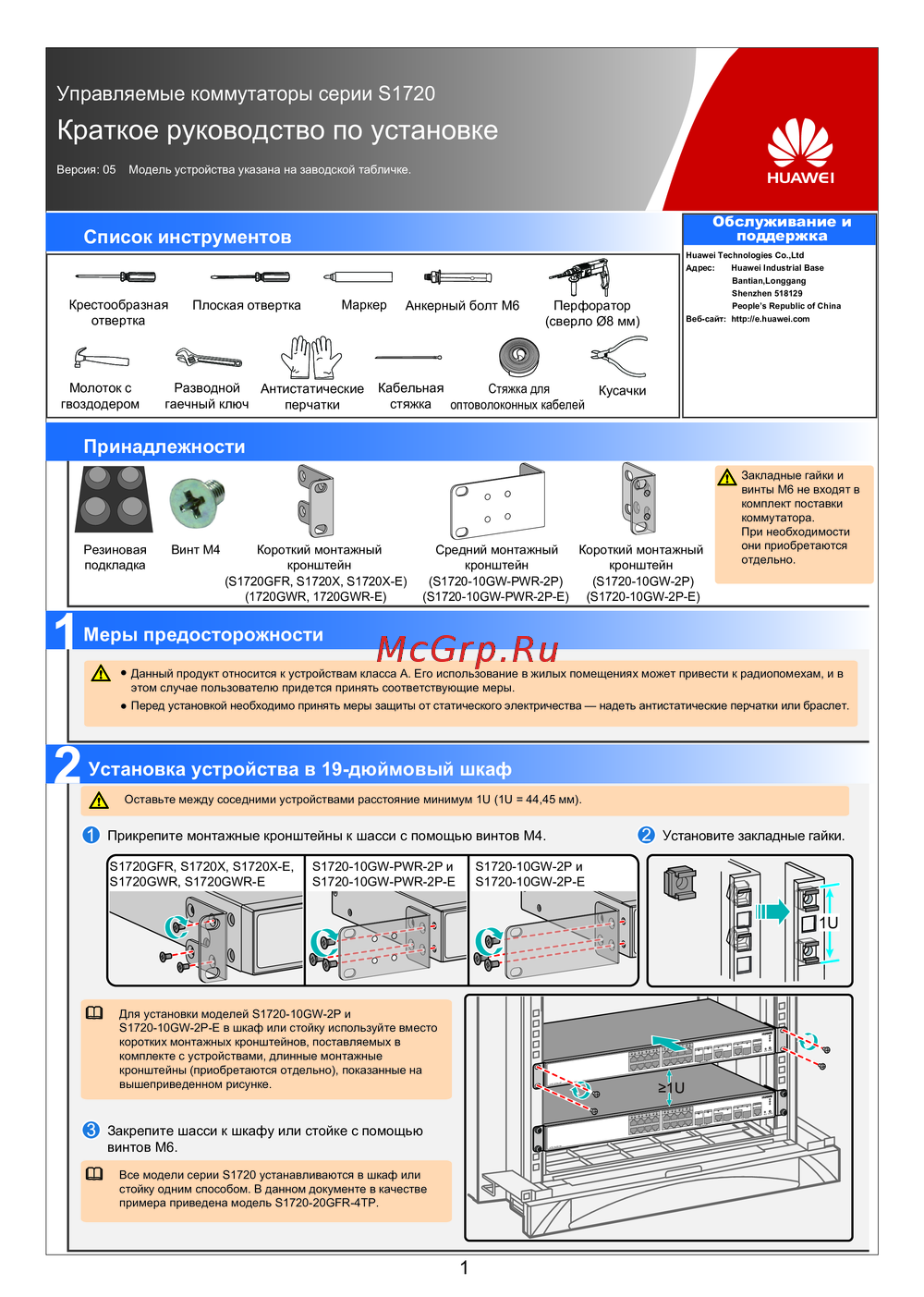 Huawei S1720-28GFR-4TP-ACКраткий обзор функций
 -
Huawei S1720-20GFR-4TPКраткая инструкция
-
Huawei S1720-10GW-2P-EСжатое руководство пользователя
-
Huawei S1720-10GW-2PБыстрый старт
-
Huawei S1720-10GW-PWR-2P-EКраткое руководство
-
Huawei S1720-10GW-PWR-2PКраткая инструкция по использованию
-
Huawei S1720GWR-EКраткая инструкция по использованию
-
Huawei S1720GWRКраткая инструкция по использованию
-
Huawei S1720X-EКраткое руководство
-
Huawei S1720XБыстрый старт
-
Huawei S1720GFRКраткое руководство пользователя
-
 Huawei CE6880Краткая эксплуатационная инструкция
Узнайте, как легко совершать и принимать звонки, используя журнал вызовов. Получите советы по управлению вызовами и настройке контактов.
