![Asus PRIME Z590-A — настройка виртуального RAID на CPU в UEFI BIOS [10/28]](/img/pdf.png)
Asus PRIME Z590-A — настройка виртуального RAID на CPU в UEFI BIOS [10/28]
Превью страниц
Страница 10 /
28
![Asus PRIME Z590-V [10/28] Virtual raid on cpu in uefi bios](/views2/1769204/page10/bga.png)
1-10
Chapter 1: Intel
®
RAID Configuration
1.1.4 Intel
®
Virtual Raid on CPU in UEFI BIOS
Some motherboards support Intel
®
Virtual Raid on CPU with RAID 0, RAID 1, RAID 5, and
RAID 10 solution. RAID 0 can be created without a KEY module, while RAID 1, RAID 5, and
RAID 10 requires a KEY module.
• The KEY module is purchased separately.
• The Hyper M.2 x16 card is purchased separately.
• Due to CPU behavior, CPU RAID functions with Intel
®
CPU RSTe only supports Intel
®
Core™ X-series Processors (6-core or above) and Intel
®
SSD modules.
• Refer to section Motherboard layout in your motherboard’s user manual for the
location of the VROC_HW_KEY connector.
If you plan on using the CPU RAID configuration spanned across different PCIE slots
as OS drives, please install the Hyper M.2 x16 cards into supported PCIE slots. Refer to
section Expansion slots in your motherboard’s user manual for more information on the
PCIE slots.
To enter the Intel
®
Virtual Raid on CPU in UEFI BIOS:
1. Enter the BIOS Setup during POST.
Refer to Chapter 3 in your motherboard’s user manual for details on entering and
navigating through the BIOS Setup.
2. Go to Boot > CSM (Compatibility Support Module), then set Launch CSM to
[Disabled].
3. Go to the Advanced > CPU Storage Configuration, then set the PCIE slot(s) that
you have installed the Hyper M.2 x16 card(s) or PCIE X4 SSD card(s) to [Hyper M.2
X16] or [PCIE X4 SSD Card] accordingly.
4. Save your changes and exit the BIOS Setup, then enter the BIOS Setup again.
5. Go to the Advanced > Intel(R) Virtual Raid on CPU to display the Intel
®
Virtual Raid
on CPU menu.
Содержание
57- Motherboard
- E16322 revised edition v5 january 2020
- Chapter 1 inte
- Raid configuration
- Chapter 2 amd raid configuration
- Contents
- Where to find more information
- How this guide is organized
- About this guide
- Raid configuration
- Raid configurations
- Intel raid configurations
- Chapter 1 intel raid configuration
- Installing storage devices
- Raid definitions
- Intel rapid storage technology in uefi bios
- Rapid storage technology in uefi bios
- Creating a raid set
- Deleting a raid set
- Virtual raid on cpu in uefi bios
- Intel virtual raid on cpu in uefi bios
- Creating a raid set
- Deleting a raid set
- Raid configuration
- Turn on the system
- To enter the inte
- To display the utility main menu
- The raid bios setup screens shown in this section are for reference only and may not exactly match the items on your screen
- The navigation keys at the bottom of the screen allow you to move through the menus the navigation keys at the bottom of the screen allow you to move through the menus and select the menu options
- Rapid storage technology option rom utility
- Intel rapid storage technology option rom utility
- Chapter 1 inte
- Raid configuration guide
- Prev next space selectdisk enter done
- Creating a raid set
- To select the hard disk drives you want to include in the raid set the select disks screen appears
- To create a raid set
- The following screen appears
- Select disks
- Deleting a raid set
- Rapid storage technology option rom utility
- Exiting the inte
- Os installation
- Installing the raid controller driver during windows 10 os installation
- Installing the raid controller driver during window
- Raid configurations
- Raid definitions
- Chapter 2 amd raid configuration
- Amd raid configuration
- Raidxpert2 configuration utility in uefi bios
- Installing storage devices
- Creating a raid set
- Deleting a raid set
- Os installation
- Installing the raid controller driver during windows 10 os installation
- Installing the raid controller driver during window
- Chapter 2 amd raid configuration
Похожие устройства
-
 Asus TUF GAMING B550-PROРуководство по быстрому запуску
 -
 Asus PRIME A520M-A IIКраткое руководство пользователя
 -
 Asus PRIME B250M-PLUSКраткое руководство
 -
 Asus TUF GAMING Z590-PLUSКраткое руководство
 -
 Asus ProArt B650-CREATORКраткий обзор функций
 -
 Asus TUF GAMING B650-PLUSБыстрый старт
 -
 Asus ROG STRIX X670E-I GAMING WIFIКраткое руководство пользователя
 -
Asus ROG FPS-IIРуководство по быстрому запуску
-
 Asus Pro WS W680M-ACE SEКраткая эксплуатационная инструкция
 -
 Asus PRIME B760M-A WIFI D4Инструкция в сокращённом виде
 -
 Asus PRIME H770-PLUSБыстрый старт
 -
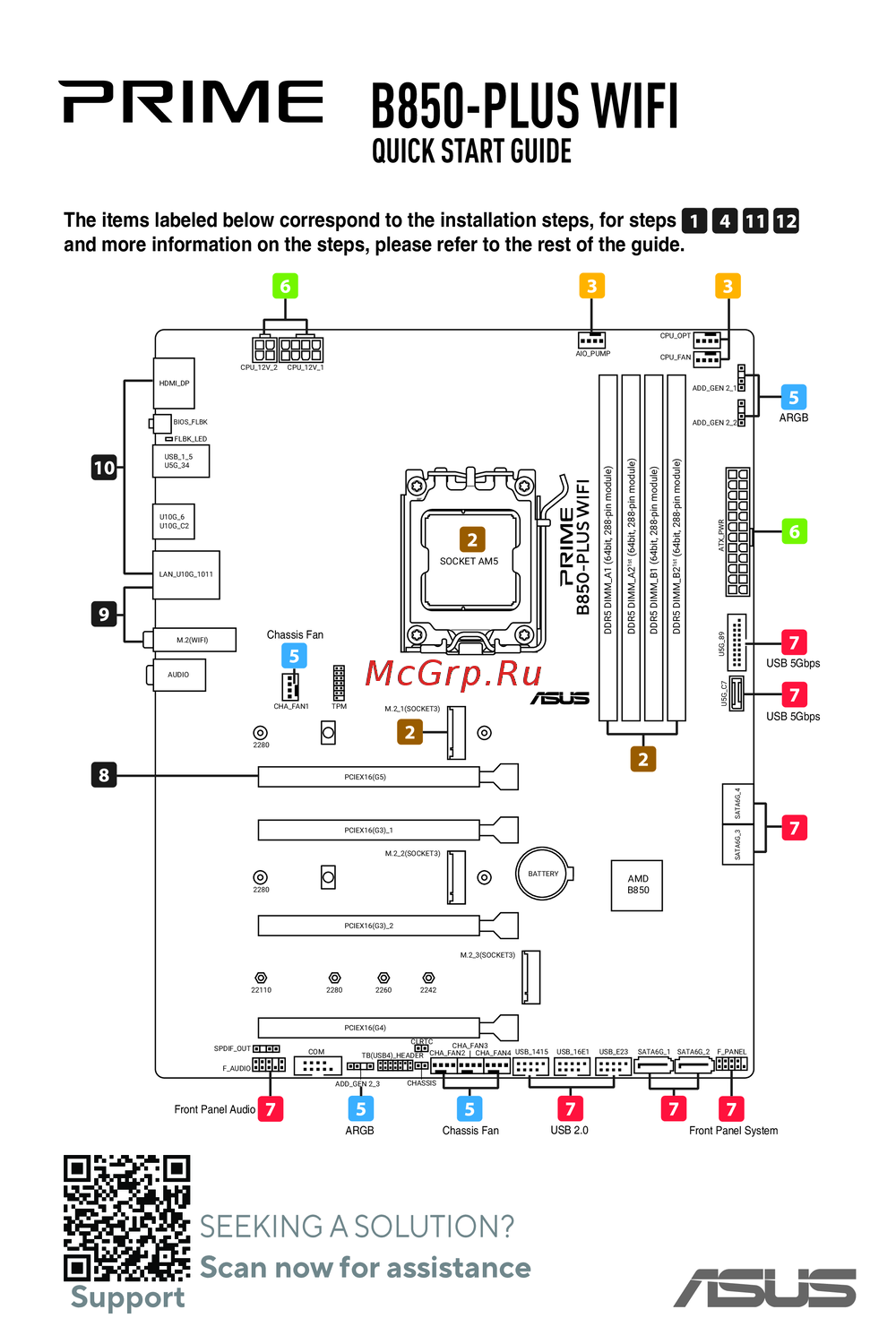 Asus B850-PLUS WIFIКраткое руководство
Узнайте, как настроить виртуальный RAID на CPU в UEFI BIOS для различных конфигураций. Подробные шаги и рекомендации по использованию ключевых модулей.