![Asus PRIME Z790-P D4 — eU Declaration of Conformity for Electronic Devices [61/64]](/icons/site-icon-64.png)
Asus PRIME Z790-P D4 — eU Declaration of Conformity for Electronic Devices [61/64]
Превью страниц
Страница 61 /
64
![Asus PRIME Z790-P D4 [61/64] Simplified ukca declaration of conformity](/views2/1920413/page61/bg3d.png)
PRIME Z790-P D4
A-5
Appendix
Simplified EU Declaration of Conformity
English ASUSTeK Computer Inc. hereby declares that this device is in compliance with the essential requirements and other relevant provisions of related
Directives. Full text of EU declaration of conformity is available at: www.asus.com/support.
Français AsusTek Computer Inc. déclare par la présente que cet appareil est conforme aux critères essentiels et autres clauses pertinentes des directives
concernées. La déclaration de conformité de l’UE peut être téléchargée à partir du site Internet suivant : www.asus.com/support.
Deutsch ASUSTeK Computer Inc. erklärt hiermit, dass dieses Gerät mit den wesentlichen Anforderungen und anderen relevanten Bestimmungen der
zugehörigen Richtlinien übereinstimmt. Der gesamte Text der EU-Konformitätserklärung ist verfügbar unter: www.asus.com/support.
Italiano ASUSTeK Computer Inc. con la presente dichiara che questo dispositivo è conforme ai requisiti essenziali e alle altre disposizioni pertinenti con le
direttive correlate. Il testo completo della dichiarazione di conformità UE è disponibile all’indirizzo: www.asus.com/support.
Русский Компания ASUS заявляет, что это устройство соответствует основным требованиям и другим соответствующим условиям соответствующих
директив. Подробную информацию, пожалуйста, смотрите на www.asus.com/support.
Български С настоящото ASUSTeK Computer Inc. декларира, че това устройство е в съответствие със съществените изисквания и другите приложими
постановления на свързаните директиви. Пълният текст на декларацията за съответствие на ЕС е достъпна на адрес: www.asus.com/support.
Hrvatski ASUSTeK Computer Inc. ovim izjavljuje da je ovaj uređaj sukladan s bitnim zahtjevima i ostalim odgovarajućim odredbama vezanih direktiva. Cijeli
tekst EU izjave o sukladnosti dostupan je na: www.asus.com/support.
Čeština Společnost ASUSTeK Computer Inc. tímto prohlašuje, že toto zařízení splňuje základní požadavky a další příslušná ustanovení souvisejících směrnic.
Plné znění prohlášení o shodě EU je k dispozici na adrese: www.asus.com/support.
Dansk ASUSTeK Computer Inc. erklærer hermed, at denne enhed er i overensstemmelse med hovedkravene og andre relevante bestemmelser i de relaterede
direktiver. Hele EU-overensstemmelseserklæringen kan findes på: www.asus.com/support.
Nederlands ASUSTeK Computer Inc. verklaart hierbij dat dit apparaat voldoet aan de essentiële vereisten en andere relevante bepalingen van de verwante
richtlijnen. De volledige tekst van de EU-verklaring van conformiteit is beschikbaar op: www.asus.com/support.
Eesti Käesolevaga kinnitab ASUSTeK Computer Inc, et see seade vastab asjakohaste direktiivide oluliste nõuetele ja teistele asjassepuutuvatele sätetele. EL
vastavusdeklaratsiooni täielik tekst on saadaval järgmisel aadressil: www.asus.com/support.
Suomi ASUSTeK Computer Inc. ilmoittaa täten, että tämä laite on asiaankuuluvien direktiivien olennaisten vaatimusten ja muiden tätä koskevien säädösten
mukainen. EU-yhdenmukaisuusilmoituksen koko teksti on luettavissa osoitteessa: www.asus.com/support.
Ελληνικά Με το παρόν, η AsusTek Computer Inc. δηλώνει ότι αυτή η συσκευή συμμορφώνεται με τις θεμελιώδεις απαιτήσεις και άλλες σχετικές διατάξεις των
Οδηγιών της ΕΕ. Το πλήρες κείμενο της δήλωσης συμβατότητας είναι διαθέσιμο στη διεύθυνση: www.asus.com/support.
Magyar Az ASUSTeK Computer Inc. ezennel kijelenti, hogy ez az eszköz megfelel a kapcsolódó Irányelvek lényeges követelményeinek és egyéb vonatkozó
rendelkezéseinek. Az EU megfelelőségi nyilatkozat teljes szövege innen letölthető: www.asus.com/support.
Latviski ASUSTeK Computer Inc. ar šo paziņo, ka šī ierīce atbilst saistīto Direktīvu būtiskajām prasībām un citiem citiem saistošajiem nosacījumiem. Pilns ES
atbilstības paziņojuma teksts pieejams šeit: www.asus.com/support.
Lietuvių „ASUSTeK Computer Inc.“ šiuo tvirtina, kad šis įrenginys atitinka pagrindinius reikalavimus ir kitas svarbias susijusių direktyvų nuostatas. Visą ES
atitikties deklaracijos tekstą galima rasti: www.asus.com/support.
Norsk ASUSTeK Computer Inc. erklærer herved at denne enheten er i samsvar med hovedsaklige krav og andre relevante forskrifter i relaterte direktiver.
Fullstendig tekst for EU-samsvarserklæringen finnes på: www.asus.com/support.
Polski Firma ASUSTeK Computer Inc. niniejszym oświadcza, że urządzenie to jest zgodne z zasadniczymi wymogami i innymi właściwymi postanowieniami
powiązanych dyrektyw. Pełny tekst deklaracji zgodności UE jest dostępny pod adresem: www.asus.com/support.
Português A ASUSTeK Computer Inc. declara que este dispositivo está em conformidade com os requisitos essenciais e outras disposições relevantes das
Diretivas relacionadas. Texto integral da declaração da UE disponível em: www.asus.com/support.
Română ASUSTeK Computer Inc. declară că acest dispozitiv se conformează cerinţelor esenţiale şi altor prevederi relevante ale directivelor conexe. Textul
complet al declaraţiei de conformitate a Uniunii Europene se găseşte la: www.asus.com/support.
Srpski ASUSTeK Computer Inc. ovim izjavljuje da je ovaj uređaj u saglasnosti sa osnovnim zahtevima i drugim relevantnim odredbama povezanih Direktiva.
Pun tekst EU deklaracije o usaglašenosti je dostupan da adresi: www.asus.com/support.
Slovensky Spoločnosť ASUSTeK Computer Inc. týmto vyhlasuje, že toto zariadenie vyhovuje základným požiadavkám a ostatým príslušným ustanoveniam
príslušných smerníc. Celý text vyhlásenia o zhode pre štáty EÚ je dostupný na adrese: www.asus.com/support.
Slovenščina ASUSTeK Computer Inc. izjavlja, da je ta naprava skladna z bistvenimi zahtevami in drugimi ustreznimi določbami povezanih direktiv. Celotno
besedilo EU-izjave o skladnosti je na voljo na spletnem mestu: www.asus.com/support.
Español Por la presente, ASUSTeK Computer Inc. declara que este dispositivo cumple los requisitos básicos y otras disposiciones pertinentes de las directivas
relacionadas. El texto completo de la declaración de la UE de conformidad está disponible en: www.asus.com/support.
Svenska ASUSTeK Computer Inc. förklarar härmed att denna enhet överensstämmer med de grundläggande kraven och andra relevanta föreskrifter i
relaterade direktiv. Fulltext av EU-försäkran om överensstämmelse finns på: www.asus.com/support.
Українська ASUSTeK Computer Inc. заявляє, що цей пристрій відповідає основним вимогам та іншим відповідним положенням відповідних Директив.
Повний текст декларації відповідності стандартам ЄС доступний на: www.asus.com/support.
Türkçe AsusTek Computer Inc., bu aygıtın temel gereksinimlerle ve ilişkili Yönergelerin diğer ilgili koşullarıyla uyumlu olduğunu beyan eder. AB uygunluk
bildiriminin tam metni şu adreste bulunabilir: www.asus.com/support.
Bosanski ASUSTeK Computer Inc. ovim izjavljuje da je ovaj uređaj usklađen sa bitnim zahtjevima i ostalim odgovarajućim odredbama vezanih direktiva. Cijeli
tekst EU izjave o usklađenosti dostupan je na: www.asus.com/support.
Simplified UKCA Declaration of Conformity
ASUSTeK Computer Inc. hereby declares that this device is in compliance with the essential requirements and other relevant provisions of related UKCA
Directives. Full text of UKCA declaration of conformity is available at: www.asus.com/support.
Содержание
261- E20551 first edition august 2022
- Chapter 2 basic installation
- Appendix
- Chapter 3 bios and raid support
- Chapter 1 product introduction
- Contents
- Safety information
- Operation safety
- Electrical safety
- Button coin batteries safety information
- How this guide is organized
- Where to find more information
- Conventions used in this guide
- About this guide
- Prime z790 p d4 specifications summary
- Prime z790 p d4 specifications summary
- Prime z790 p d4 specifications summary
- Prime z790 p d4 specifications summary
- Package contents
- Before you proceed
- Take note of the following precautions before you install motherboard components or change any motherboard settings
- Product introduction
- Prime z790 p d4
- Chapter 1 product introduction
- Chapter 1
- Audio codec
- Motherboard layout
- Ethernet
- Chapter 1 product introduction
- Chapter 1
- 9 4 18 7 16
- 2 1 4 4 4
- 13 15 19
- Chapter 1
- Chapter 1 product introduction
- Chapter 1
- The motherboard comes with a lga1700 socket designed for 1
- Processors
- Lga1700
- Gold and celero
- Gen inte
- Cpu socket
- Core processors 1
- Core pentiu
- Chapter 1
- Recommended memory configurations
- Dimm_b1 dimm_b2
- Dimm_a1 dimm_a2
- You may install 4 gb 8 gb 16 gb and 32 gb unbuffered and non ecc ddr4 dimms into the dimm sockets
- Memory configurations
- Chapter 1 product introduction
- Chapter 1
- Recommended vga configuration
- Chapter 1
- Cha_fan3
- The fan and pump headers allow you to connect fans or pumps to cool the system
- Slot description quantity of identifiable m ssd pcs
- Situation 1 situation 2
- Pcie x16 1 x16 2 x8 x8
- Pcie bifurcation m settings in pcie x16 slot from cpu
- Fan and pump headers
- Cpu_opt
- Chapter 1 product introduction
- Chapter 1
- Cha_fan2
- Cha_fan1
- Aio_pump cpu_fan
- Chapter 1
- The m slots allow you to install m devices such as m ssd modules
- M slots
- M _3 socket3
- M _2 socket3
- M _1 socket3
- Chapter 1 product introduction
- Chapter 1
- The sata 6gb s ports allow you to connect sata devices such as optical disc drives and hard disk drives via a sata cable
- Sata6g_4 sata6g_3
- Sata6g_2 sata6g_1
- Sata 6gb s ports
- Rapid storage technology through the onboard inte
- Prime z790 p d4
- If you installed sata storage devices you can create a raid 0 1 5 and 10 configuration with the inte
- Chapter 1
- Before creating a raid set refer to the raid configuration guide you can download the raid configuration guide from the asus website
- Z790 chipset
- Front panel connector
- Usb 3 gen 2 type
- Usb 3 gen 1 headers
- U32g2_c4
- The usb 3 gen 2 type
- The usb 3 gen 1 module is purchased separately
- The usb 3 gen 1 headers allow you to connect usb 3 gen 1 modules for additional usb 3 gen 1 ports the usb 3 gen 1 headers provide data transfer speeds of up to 5 gb s
- Port on the front panel the usb 3 gen 2 type
- Module is purchased separately
- Module for an additional usb 3 gen 2 type
- Connector provides data transfer speeds of up to 10 gb s
- Connector allows you to connect a usb 3 gen 2 type
- Chapter 1 product introduction
- Chapter 1
- Chapter 1
- Usb_e12 usb_e34
- Usb_e1 port usb_e2 port usb_e3 port and usb_e4 port share the bandwidth
- Usb 2 headers
- The usb 2 module is purchased separately
- The usb 2 headers allow you to connect usb modules for additional usb 2 ports the usb 2 headers provide data transfer speeds of up to 480 mb s
- Prime z790 p d4
- Do not connect a 1394 cable to the usb connectors doing so will damage the motherboard
- The addressable gen 2 headers allow you to connect individually addressable rgb ws2812b led strips or ws2812b based led strips
- Chapter 1 product introduction
- Chapter 1
- Addressable gen 2 headers
- Add_gen 2_1 add_gen 2_3 add_gen 2_2
- Rgb_header
- Prime z790 p d4
- Chapter 1
- Aura rgb header
- The rgb header allows you to connect rgb led strips
- Chapter 1
- Chapter 1
- This header supports a trusted platform module tpm system with a serial peripheral interface spi allowing you to securely store keys digital certificates passwords and data a tpm system also helps enhance network security protects digital identities and ensures platform integrity
- The s pdif out header allows you to connect the sony philips digital interface s pdif out module
- Spi tpm header 14 1pin
- Spdif_out
- S pdif out header
- Chapter 1 product introduction
- Chapter 1
- Chapter 1
- Tb_header
- Please visit the official website of your purchased thunderbolt card for more details on compatibility
- Header
- Chapter 1 product introduction
- Chapter 1
- Thunderbol
- The thunderbolt header allows you to connect an add on thunderbolt i o card that supports intel s thunderbolt technology allowing you to connect thunderbolt enabled devices to form a daisy chain configuration
- The thunderbolt card can only be used when installed to the pciex16 g4 _3 slot ensure to install your thunderbolt card to the pciex16 g4 _3 slot
- The add on thunderbolt i o card and thunderbolt cables are purchased separately
- Cpu installation
- Chapter 2 basic installation
- Chapter 2
- Building your pc system
- Basic installation
- Chapter 2 basic installation
- Chapter 2
- To install a cpu heatsink and fan assembly
- Prime z790 p d4
- Cooling system installation
- Chapter 2
- Chapter 2
- Chapter 2 basic installation
- To install an aio cooler
- Prime z790 p d4
- Chapter 2
- Dimm installation
- Chapter 2
- M installation
- Chapter 2
- Chapter 2
- Motherboard installation
- Chapter 2
- Chapter 2
- Prime z790 p d4
- Or and
- Chapter 2
- Atx power connection
- Sata device connection
- Chapter 2
- Front i o connector
- Chapter 2
- Expansion card installation
- Chapter 2
- To install thunderbolt series card
- Prime z790 p d4
- Chapter 2
- Motherboard rear and audio connections
- Rear i o connection
- Chapter 2
- Audio i o ports
- Audio i o connections
- Audio 2 4 5 or 7 channel configuration
- Activity link led
- Status description
- Speed led
- Realtek 2 g ethernet port led indications
- Prime z790 p d4
- Port 2 channel 4 channel 5 channel 7 channel
- Orange 1 gbps 100 mbps 10 mbps connection
- Off no link
- Green linked
- Green 2 gbps connection
- Connect to headphone and mic
- Chapter 2
- Blinking data activity
- Chapter 2
- Connect to 7 channel speakers
- Vertical m slot key e
- Chapter 2
- Turning off the computer
- Starting up for the first time
- Chapter 2
- You have installed a new system component that requires further bios settings or update
- Prime z790 p d4
- Knowing bios
- Chapter 3 bios and raid support
- Chapter 3
- Bios basic input and output system stores system hardware settings such as storage device configuration overclocking settings advanced power management and boot device configuration that are needed for system startup in the motherboard cmos in normal circumstances the default bios settings apply to most conditions to ensure optimal performance do not change the default bios settings except in the following circumstances
- Bios and raid support
- An error message appears on the screen during the system bootup and requests you to run the bios setup
- Entering bios setup after post
- Entering bios at startup
- Chapter 3
- Bios setup program
- Bios menu screen
- Chapter 3
- Asus ez flash 3
- Recovering the bios
- Chapter 3
- Asus crashfree bios 3
- Raid definitions
- Raid configurations
- Chapter 3
- Chapter 3 bios and raid support
- Chapter 3
- Notices
- Hdmi trademark notice
- Fcc compliance information
- Appendix
- Appendix
- Appendix
- Vietnam rohs
- Türkiye rohs
- India rohs
- Google license terms
- Eu rohs
- Eu reach and article 33
- Declaration of compliance for product environmental regulation
- 安全上のご注意
- Safety precautions
- France sorting and recycling information
- Asus recycling takeback services
- Appendix
- Simplified ukca declaration of conformity
- Simplified eu declaration of conformity
- Prime z790 p d4
- Appendix
- Warranty
- Všechny informace o záruce najdete na adrese https www asus com cz support
- Sve informacije o jamstvu potražite na https www asus com support
- Pour plus d informations sur la garantie consultez le site https www asus com fr support
- Lt informacija apie asus garantiją
- For all the guarantee information please visit https www asus com support
- Die vollständigen garantieinformationen finden sie unter https www asus com de support
- Appendix
- Prime z790 p d4
- Appendix
- Asustek uk limited
- Asustek computer inc
- Asus contact information
- Asus computer international america
- Asus computer gmbh germany and austria
- Appendix
- Service and support
Похожие устройства
-
 Asus TUF GAMING B550-PROРуководство по быстрому запуску
 -
 Asus PRIME A520M-A IIКраткое руководство пользователя
 -
 Asus PRIME B250M-PLUSКраткое руководство
 -
 Asus TUF GAMING Z590-PLUSКраткое руководство
 -
 Asus ProArt B650-CREATORКраткий обзор функций
 -
 Asus TUF GAMING B650-PLUSБыстрый старт
 -
 Asus ROG STRIX X670E-I GAMING WIFIКраткое руководство пользователя
 -
Asus ROG FPS-IIРуководство по быстрому запуску
-
 Asus Pro WS W680M-ACE SEКраткая эксплуатационная инструкция
 -
 Asus PRIME B760M-A WIFI D4Инструкция в сокращённом виде
 -
 Asus PRIME H770-PLUSБыстрый старт
 -
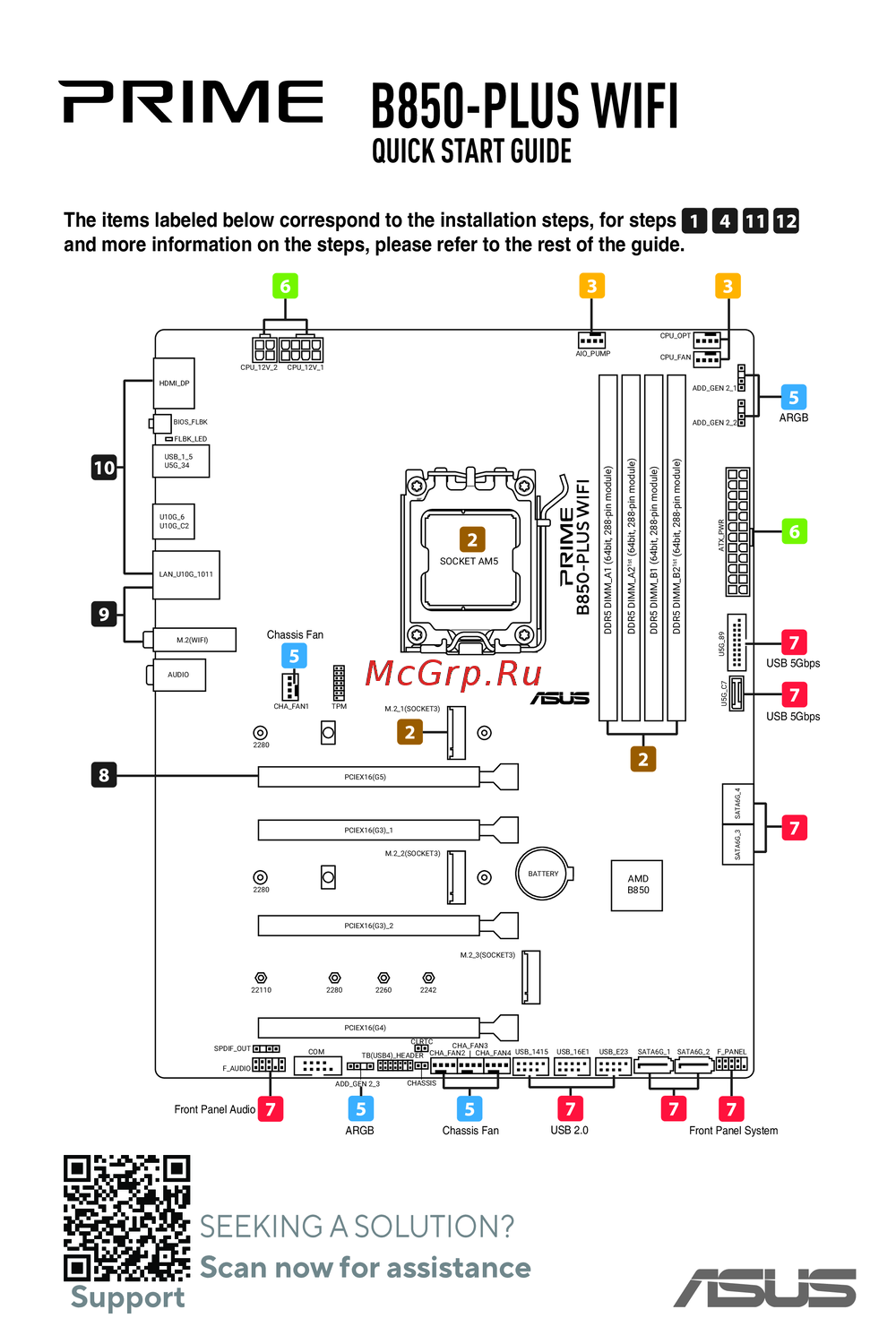 Asus B850-PLUS WIFIКраткое руководство
Discover the essential requirements for electronic devices and their compliance with EU directives. Access the full declaration of conformity for detailed information.