![APC Back-UPS BE550G-FR — руководство по эксплуатации источника бесперебойного питания [1/6]](/icons/site-icon-64.png)
APC Back-UPS BE550G-FR — руководство по эксплуатации источника бесперебойного питания [1/6]
Превью страниц
Страница 1 /
6
Operation Manual
Back-UPS
™
ES 550/700
Connect the Battery
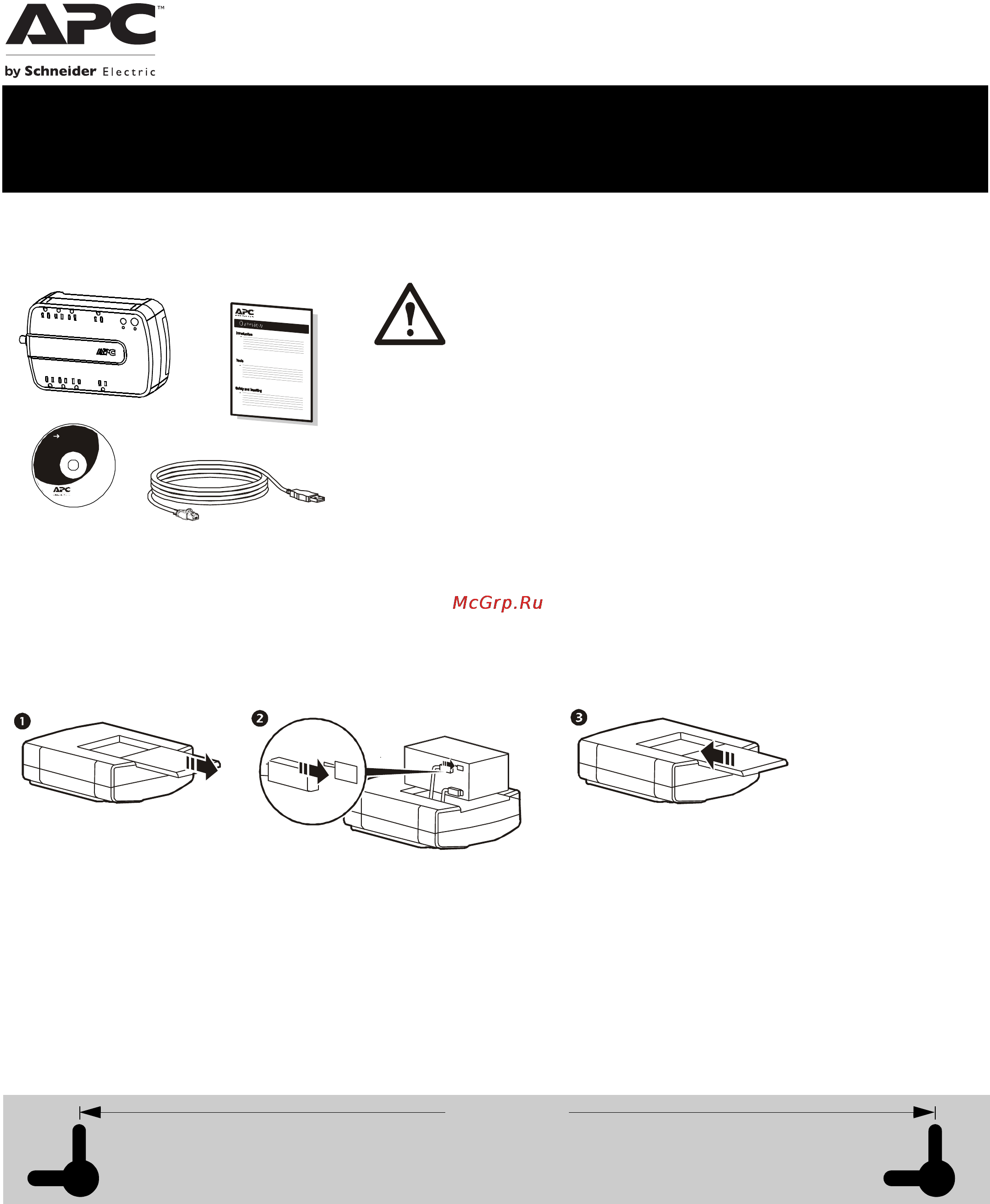
The Back-UPS is shipped with one battery cable disconnected. Remove the “Stop! Connect the Battery” label that covers the
outlets. Prior to connecting any equipment to the unit, connect the battery cable to the unused battery terminal. It is normal for
small sparks to be seen when the battery cable is connected to the battery terminal.
Wall Mount Installation
The UPS can be installed vertically or horizontally to a wall. Use the template to assist with installation and a fastener (not
included) that can support at least 6.8 kg.
1. Hold the template against the wall surface and use a nail or pin to mark the center of each hole.
2. Install a fastener into the wall at the marked locations. Allow 8 mm of the fastener to protrude from the wall.
3. Install the unit on the wall, using the fasteners.
Inventory Safety and General Information
Inspect the package contents upon receipt. Notify
the carrier and dealer if there is any damage.
Read the Safety Guide supplied with this unit before
installing the UPS.
• This UPS is intended for indoor use only.
• Do not operate this UPS in direct sunlight, in contact with fluids, or where there is
excessive dust or humidity.
• Be sure the air vents on the UPS are not blocked. Allow adequate space for proper
ventilation.
• The battery typically lasts for two to three years. Environmental factors impact battery life.
Elevated ambient temperatures, poor quality AC power, and frequent short duration
discharges will shorten battery life.
• Connect the UPS power cable directly to a wall outlet. Do not use surge protectors or
extension cords.
Charge the battery for at
least 16 hours before
use.
bu075c
B
a
c
k
-
U
P
S
Us er D oc ume nta tion
bu034a
bu0 35 a
b
u036a
165 mm
(6.50 in.)
Wall-mounting Template
Содержание
40- Inventory safety and general information
- Es 550 700
- Connect the battery
- Operation manual back up
- Mm 6 0 in
- Inventory
- Inspect the package contents upon receipt notify the carrier and dealer if there is any damage read the safety guide supplied with this unit before installing the ups
- Inspect the package contents upon receipt notify the carrier and dealer if there is any damage
- Wall mounting template
- Wall mount installation
- Safety and general information
- Read the safety guide supplied with this unit before installing the ups
- Connect the equipment
- Software
- Powerchut
- Powerchute personal edition software
- Power saving feature
- Personal edition software
- Overview
- Operation
- Install powerchute software
- Install powerchut
- Compatibility
- Turn on the back ups
- Troubleshooting
- Status led indicator audible indicator on audible indicator terminates
- Status indicators
- Problem probable cause solution
- Specifications
- Replace the used battery with an apc by schneider electric approved battery replacement batteries can be ordered through the apc by schneider electric web site www apc com battery replacement parts are rbc110 for back ups be550 and rbc17 for back ups be700
- Replace battery
- Protection and filter
- Problem probable cause solution
- Physical
- Output
- Deliver the used battery to a recycling facility
- Battery
- Service
- Apc by schneider electric it customer support worldwide
- Warranty
Похожие устройства
-
 APC SURT6000 VA 3UИнструкция по эксплуатации
 -
APC SURT5000 VA 3UИнструкция по эксплуатации
-
APC SURT3000 VA 3UИнструкция по эксплуатации
-
 APC ES 525VA BE525-RSИнструкция по эксплуатации
 -
 APC CS 350VA BK350-EIИнструкция по эксплуатации
 -
 APC Back-UPS BE700G-FR ARИнструкция по эксплуатации
 -
 APC Back-UPS BGE 90M-CA 120VИнструкция по эксплуатации
 -
APC Back-UPS BK500Инструкция по эксплуатации
-
 APC Back-UPS BK350Инструкция по эксплуатации
 -
 APC Smart-UPS SUA1000RMI2UИнструкция по эксплуатации
 -
 APC Back-UPS BR1500G-RSИнструкция по эксплуатации
 -
 APC Back-UPS BR900G-RSИнструкция по эксплуатации
Узнайте, как правильно подключить и установить источник бесперебойного питания. Следуйте инструкциям по безопасности и уходу за батареей для долговечной работы устройства.
