![Asus ROG STRIX B450-I GAMING — настройки BIOS для оптимизации работы системы и устройств [67/92]](/icons/site-icon-64.png)
Asus ROG STRIX B450-I GAMING — настройки BIOS для оптимизации работы системы и устройств [67/92]
Превью страниц
Страница 67 /
92
![Asus ROG STRIX B450-I GAMING [67/92] Cpu configuration](/views2/1769613/page67/bg43.png)
ROG STRIX B450-I GAMING
3-15
Chapter 3
PSS Support
This item allows you enable or disable the generation of ACPI_PPC, _PSS, and _PCT
objects.
Conguration options: [Disabled] [Enabled] [Auto]
SVM Mode
This item allows you enable or disable CPU Virtualization.
Conguration options: [Disabled] [Enabled]
3.6.2 CPU Configuration
The items in this menu show the CPU-related information that the BIOS automatically
detects.
The items in this menu may vary based on the CPU installed.
3.6.3 ROG Effects
The item in this menu allows you to customize the effect settings for better ROG effects.
Onboard LED
This item allows you to turn on/off the onboard LED.
Conguration options: [Enabled] [Disabled]
3.6.4 NB Configuration
The items in this menu allow you to change the settings of the north bridge related items.
IGFX Multi-Monitor
This item allows you to enable or disable Internal Graphics Device Multi-Monitor Support for
add-on VGA devices.
Conguration options: [Enable] [Disable]
Primary Video Device
This item allows you to decide which graphics controller to use as the primary boot device.
Conguration options: [IGFX Video] [PCIE/PCI Video]
UMA Frame Buffer Size
This item allows you to select the UMA FB size.
Conguration options: [Auto] [32M] - [2G]
3.6.5 SATA Configuration
While entering Setup, the BIOS automatically detects the presence of SATA devices. The
SATA Port items show Not Present if no SATA device is installed to the corresponding SATA
port.
SATA Port Enable
This item allows you to enable or disable the SATA Device.
Conguration options: [Disabled] [Enabled]
E14337_ROG_STRIX_B450-I_GAMING_UM.indb 15 2018-06-15 18:28:39
Содержание
369- Motherboard
- E14337 first edition june 2018
- Contents
- Chapter 2 basic installation
- Chapter 1 product introduction
- Chapter 3 bios setup
- Chapter 4 raid support
- Appendix
- Safety information
- Operation safety
- Electrical safety
- How this guide is organized
- About this guide
- Where to find more information
- Typography
- Conventions used in this guide
- Rog strix b450 i gaming specifications summary
- Rog strix b450 i gaming specifications summary
- Rog strix b450 i gaming specifications summary
- Rog strix b450 i gaming specifications summary
- Package contents
- The tools and components in the table above are not included in the motherboard package
- Installation tools and components
- E14337_rog_strix_b450 i_gaming_um indb 13 2018 06 15 18 28 25
- Product introduction
- Motherboard overview
- Chapter 1 product introduction
- Chapter 1
- Before you proceed
- Motherboard layout
- Chapter 1 product introduction
- Chapter 1
- Layout contents
- Chapter 1
- Themotherboardcomeswithanam4socketdesignedforamdryzen 2ndgeneration ryzen 1stgeneration ryzen withradeon vegagraphicsprocessors
- Rog strix b450 i gaming cpu am4
- Chapter 1 product introduction
- Chapter 1
- Central processing unit cpu
- System memory
- Recommended memory configurations
- Chapter 1
- Memory configurations
- Chapter 1 product introduction
- Chapter 1
- Youmayinstall2gb 4gb 8gb and16gbunbufferedandnon eccddr4dimmsinto thedimmsockets
- Slot no slot description
- Sata mode
- Rog strix b450 i gaming
- Pcie3 x16slot
- Pcie x16 m _1
- Pcie mode
- Expansion slots
- Chapter 1
- Amd ryzen with radeon vega graphics processor
- Amd ryzen 2nd generation ryzen 1st generation processors
- Jumper
- Chapter 1
- Onboard leds
- Rog strix b450 i gaming cpu dram boot_device vga led
- Chapter 1
- Chapter 1
- Theseconnectorsconnecttoserialata6 gb sharddiskdrivesviaserialata6 gb ssignalcables
- Serial ata 6 gb s connectors 7 pin sata6g_1 4
- Rog strix b450 i gaming amd serial ata 6 gb s connectors
- Rog strix b450 i gaming
- Internal connectors
- Ifyouinstalledserialataharddiskdrives youcancreatearaid0 1 and10 configurationthroughtheonboardam
- Chapter 1
- B450chipset
- Thisconnectorisforausb2 port connecttheusbmodulecabletothisconnector theninstallthemoduletoaslotopeningatthebackofthesystemchassis thisusb connectorcomplieswithusb2 specificationthatsupportsupto480mb sconnection speed
- Theseconnectorsareforatxpowersupplyplugs thepowersupplyplugsare designedtofittheseconnectorsinonlyoneorientation findtheproperorientationand pushdownfirmlyuntiltheconnectorscompletelyfit
- Rog strix b450 i gaming usb 2 connector
- Rog strix b450 i gaming atx power connectors
- Chapter 1 product introduction
- Chapter 1
- Atx power connectors 24 pin eatxpwr 8 pin eatx12v
- Usb 2 connector 10 1 pin usb12
- Chapter 1
- Thisconnectorisforindividuallyaddressablergbws2812bledstripswith embeddedws2811leddriverics
- Rog strix b450 i gaming add header
- Chapter 1 product introduction
- Chapter 1
- Addressable rgb header 4 1 pin add_header1
- Thisconnectorisforrgbledstrips
- Rog strix b450 i gaming rgb_header connector
- Rog strix b450 i gaming
- Chapter 1
- Aura rgb header 4 pin rgb_header
- Chapter 1
- Fan and pump connectors 4 pin cpu_fan 4 pin aio_pump 4 pin cha_fan
- Connectthefancablestothefanconnectorsonthemotherboard ensuringthatthe blackwireofeachcablematchesthegroundpinoftheconnector
- Chapter 1
- Thisconnectorisforthethermistorcablethatallowsyoutomonitorthetemperatureof yourmotherboard scriticalcomponentsandconnecteddevices
- Thermal sensor connector 2 pin t_sensor
- Rog strix b450 i gaming t_sensor connector
- Rog strix b450 i gaming fan connectors
- Rog strix b450 i gaming
- Thesesocketsallowyoutoinstallm ssdmodules
- Rog strix b450 i gaming m socket
- M sockets m _1 m _2
- Chapter 1 product introduction
- Chapter 1
- Chapter 1
- Chapter 1 product introduction
- Chapter 1
- Chapter 2
- Building your pc system
- Basic installation
- Cpu installation
- Chapter 2 basic installation
- Cpu heatsink and fan assembly type 1
- Cooling system installation
- Chapter 2 basic installation
- Chapter 2
- Rog strix b450 i gaming
- Cpu heatsink and fan assembly type 2
- Chapter 2
- To install an aio cooler
- Chapter 2 basic installation
- Chapter 2
- Motherboard installation
- Chapter 2
- Chapter 2
- Chapter 2
- Dimm installation
- Sata device connection
- Chapter 2
- Atx power connection
- Front i o connector
- Chapter 2
- Expansion card installation
- Chapter 2
- M installation
- M _2 socket bottom side
- Chapter 2 basic installation
- Chapter 2
- Rog strix b450 i gaming
- Installing the asus 2x2 dual band w fi antennas
- Connect the bundled asus 2x2 dual band wi fi antennas to the wi fi ports at the back of the chassis
- Chapter 2
- Wi fi antenna installation
- Rear i o connection
- Motherboard rear and audio connections
- Chapter 2
- Lan ports led indications
- Connect to headphone and mic
- Chapter 2
- Audio i o ports
- Audio i o connections
- Audio 2 4 5 or 7 channel configuration
- Chapter 2
- Chapter 2
- Turning off the computer
- Starting up for the first time
- Chapter 2
- Bios setup
- Knowing bios
- Chapter 3 bios setup
- Chapter 3
- To enter bios setup after post
- Simultaneously
- Press the reset button on the system chassis
- Press the power button to turn the system off then back on do this option only if you failed to enter bios setup using the first two options
- Post continues with its routines
- Key to enter bios
- Hotkey
- Entering bios setup after post
- Entering bios at startup
- Chapter 3 bios setup
- Chapter 3
- Bios setup program
- Bios menu screen
- Use the bios setup to update the bios or configure its parameters the bios screen include navigation keys and brief onscreen help to guide you in using the bios setup program
- The default screen for entering the bios setup program can be changed refer to the setup mode item in section boot menu for details
- The advanced mode provides advanced options for experienced end users to configure the bios settings the figure below shows an example of the advanced mode refer to the following sections for the detailed configurations
- Rog strix b450 i gaming
- Chapter 3
- Advanced mode
- Submenu items
- Q fan control f6
- My favorites f3
- Menu items
- Menu bar
- Language
- Ez tuning wizard f11
- Chapter 3
- Chapter 3
- Aura f4
- Search on faq
- Search f9
- Scroll bar
- Last modified button
- Hot keys
- General help
- Configuration fields
- The boot device options vary depending on the devices you installed to the system
- Hotkey for the advanced bios settings
- Hotkey
- Ez mode
- Chapter 3 bios setup
- Chapter 3
- Rog strix b450 i gaming
- Q fan control
- Chapter 3
- The qfan control allows you to set a fan profile or manually configure the operating speed of your cpu and chassis fans
- Configuring fans manually
- Chapter 3
- Oc tuning
- Ez tuning wizard
- Chapter 3
- Chapter 3
- My favorites
- Chapter 3
- Chapter 3
- Adding items to my favorites
- Bclk frequency
- Auto loads the optimal settings for the system
- Allows you to select the cpu overclocking options to achieve the desired cpu internal frequency configuration options
- Ai tweaker menu
- Ai overclock tuner
- To adjust the value
- The security menu items allow you to change the system security settings
- The main menu screen appears when you enter the advanced mode of the bios setup program the main menu provides you an overview of the basic system information and allows you to set the system date time language and security settings
- The ai tweaker smenu items allow you to configure overclocking related items
- Security
- Rog strix b450 i gaming
- Manual allows you to individually set overclocking parameters
- Main menu
- D o c p allows you to select a dram o c profile and the related parameters will be adjusted automatically
- Chapter 3
- Memory frequency
- Firmware tpm
- Cpu core ratio
- Chapter 3
- Amd ftpm configuration
- Advanced menu
- Uma frame buffer size
- Svm mode
- Sata port enable
- Sata configuration
- Rog effects
- Pss support
- Primary video device
- Onboard led
- Nb configuration
- Igfx multi monitor
- Cpu configuration
- Chapter 3
- M gray
- Hd audio controller
- Chapter 3
- Audio jack led lighting
- Smart self test
- Sata6g_1 gray sata6g_4 gray
- Sata mode
- Onboard devices configuration
- Wi fi controller
- Sb link mode
- Rgb led lighting
- Pciex16 mode
- M _1 link mode
- Intel lan oprom
- Intel lan controller
- Erp ready disabled
- Chapter 3
- Bluetooth controller
- Apm configuration
- Chapter 3
- Xhci hand off
- Usb mass storage driver support
- Usb configuration
- Restore on ac power loss
- Power on by rtc
- Power on by pci e pci
- Network stack configuration
- Legacy usb support
- Hdd ssd smart information
- Q fan configuration
- Monitor menu
- Fast boot
- Csm compatibility support module
- Chapter 3
- Boot menu
- Boot configuration
- Usb single port control
- Secure boot
- Chapter 3
- Boot override
- Boot option priorities
- Tool menu
- Setup animator
- Chapter 3
- Asus ez flash 3 utility
- Ssd speeds may lower over time as with any storage medium due to data processing asus secure erase completely and safely cleans your ssd restoring it to factory performance levels
- Chapter 3 bios setup
- Chapter 3
- Asus secure erase on the advanced mode menu
- Asus secure erase
- Asus user profile
- Asus spd information
- Save to profile
- Profile name
- Load save profile from to usb drive
- Load profile
- Graphics card information
- Gpu post
- Chapter 3
- Bus interface
- Save changes reset
- Load optimized defaults
- Launch efi shell from usb drives
- Exit menu
- Discard changes exit
- Chapter 3
- Ez update
- Chapter 3
- Updating bios
- Chapter 3
- Asus ez flash 3
- To update the bios by internet
- Select via internet
- Rog strix b450 i gaming
- Reboot the system when the update process is done
- Follow the onscreen instructions to complete the update
- Chapter 3
- Recovering the bios
- Chapter 3
- Asus crashfree bios 3
- Raid definitions
- Chapter 4 raid support
- Chapter 4
- Amd raid array configurations
- Raid support
- Chapter 4 raid support
- Chapter 4
- Notices
- Federal communications commission statement
- Appendix
- Appendix
- Warning
- Rf exposure warning
- Regional notice for california
- Asus recycling takeback services
- Appendix
- Fcc bluetooth wireless compliance
- D é claration d industrie canada relative aux modules sans fil bluetooth
- Bluetooth industry canada statement
- Appendix
- Ncc taiwan wireless statement
- Japan rf equipment statement
- Pr é cautions d emploi de l appareil
- Google license terms
- Appendix
- E14337_rog_strix_b450 i_gaming_um indb 6 2018 06 15 18 28 40
- Appendix
- E14337_rog_strix_b450 i_gaming_um indb 7 2018 06 15 18 28 41
- Asus rog strix b450 i gaming
- Appendix
- Technical support
- Asustek computer inc
- Asus contact information
- Asus computer international america
- Asus computer gmbh germany and austria
- Appendix
- Fcc compliance information
- Asus computer international
- Appendix
- Appendix
Похожие устройства
-
 Asus TUF GAMING B550-PROРуководство по быстрому запуску
 -
 Asus PRIME A520M-A IIКраткое руководство пользователя
 -
 Asus PRIME B250M-PLUSКраткое руководство
 -
 Asus TUF GAMING Z590-PLUSКраткое руководство
 -
 Asus ProArt B650-CREATORКраткий обзор функций
 -
 Asus TUF GAMING B650-PLUSБыстрый старт
 -
 Asus ROG STRIX X670E-I GAMING WIFIКраткое руководство пользователя
 -
Asus ROG FPS-IIРуководство по быстрому запуску
-
 Asus Pro WS W680M-ACE SEКраткая эксплуатационная инструкция
 -
 Asus PRIME B760M-A WIFI D4Инструкция в сокращённом виде
 -
 Asus PRIME H770-PLUSБыстрый старт
 -
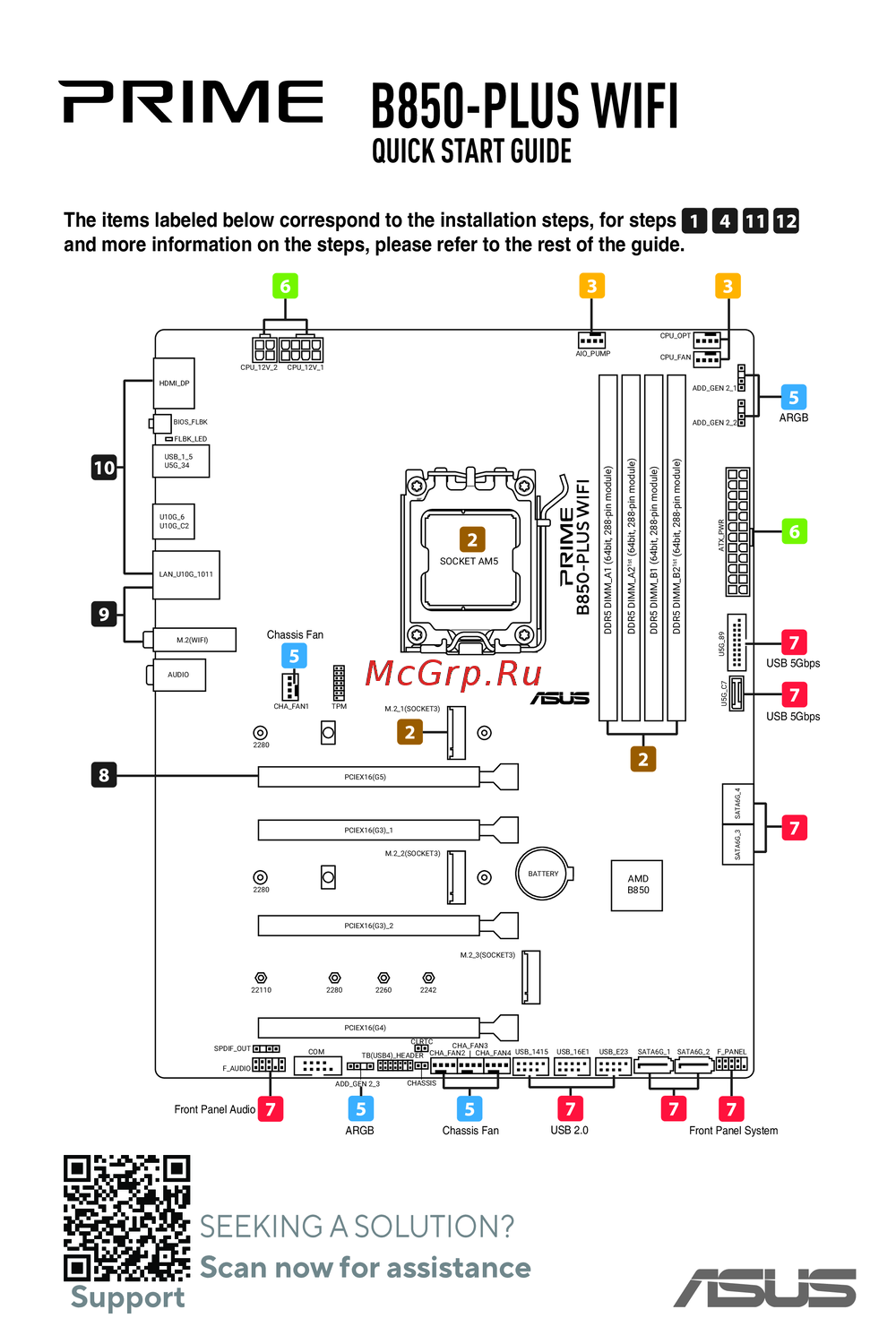 Asus B850-PLUS WIFIКраткое руководство
Узнайте, как настроить параметры BIOS для управления процессором, графикой и SATA-устройствами. Оптимизируйте производительность вашего ПК с помощью простых шагов.
